


Overview
Design Resources
Design & Integration File
- Schematics
- Bill of Materials
- Gerber Files
- PADS Files
- Assembly Drawing
Evaluation Hardware
Part Numbers with "Z" indicate RoHS Compliance. Boards checked are needed to evaluate this circuit.
- EVAL-CN0274-SDPZ ($67.68) Ultralow Power Standalone Motion Switch
- EVAL-SDP-CS1Z ($66.32) Eval Control Board
Device Drivers
Software such as C code and/or FPGA code, used to communicate with component's digital interface.
Features & Benefits
- Motion activated, high-side power switch
- Programmable operating range
- Ultra low power (300nA when "sleeping")
- Perfect for battery operated applications
Product Categories
Markets and Technologies
Parts Used
Documentation & Resources
-
Ultra-Low Power Standalone Motion Switch (CN0274)10/22/2018WIKI
-
MT-101: Decoupling Techniques2/14/2015PDF954 kB
-
MT-031: Grounding Data Converters and Solving the Mystery of "AGND" and "DGND"3/20/2009PDF144 kB
-
CN0274:Ultralow Power Standalone Motion Switch2/14/2015PDF253 kB
Circuit Function & Benefits
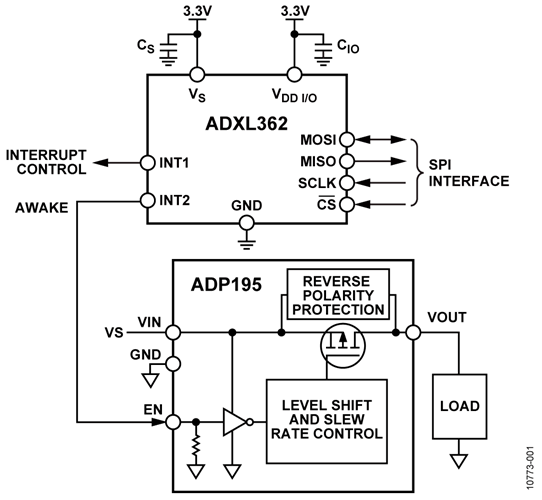
The combination of parts shown in Figure 1 provides an ultralow power, 3-axis, motion activated power switch solution capable of controlling up to 1.1 A of load current. The circuit is ideal for applications where extended battery life is critical. When the switch is off, the battery current is less than 300 nA, and when the switch is on, it draws less than 3 μA. The circuit provides an industry leading, low power motion sensing solution suitable for wireless sensors, metering devices, home healthcare, and other portable applications.
The 3-axis accelerometer controls the high-side switch by monitoring the acceleration in three axes and closes or opens the switch depending on the presence or absence of motion.
The ADXL362 is an ultralow power, 3-axis accelerometer that consumes less than 100 nA in wake-up mode. Unlike accelerometers that use power duty cycling to achieve low power consumption, the ADXL362 does not alias input signals by under sampling; it samples continuously at all data rates. There is also an on-chip, 12-bit temperature sensor accurate to ±0.5°.
The ADXL362 provides 12-bit output resolution and has three operating ranges, ±2 g, ±4 g, and ±8 g. It is specified over a minimum temperature range of −40°C to +85°C. For applications where a noise level less than 480 μg/√Hz is desired, either of its two lower noise modes (down to 120 μg/√Hz) can be selected at a minimal increase in supply current.
The ADP195 is a high-side load switch designed for operation between 1.1 V and 3.6 V and is protected against reverse current flow from output to input. The device contains a low on-resistance, P-channel MOSFET that supports over 1.1 A of continuous load current and minimizes power losses.

Basic Operation of the ADXL362
The ADXL362 is a three-axis, ultralow power acceleration measurement system capable of measuring dynamic acceleration (resulting from motion or shock) as well as static acceleration (that is, gravity).
The moving component of the sensor is a polysilicon, surface micromachined structure, also referred to as a beam, built on top of a silicon wafer. Polysilicon springs suspend the structure over the surface of the wafer and provide a resistance against acceleration forces.
Deflection of the structure is measured using differential capacitors. Each capacitor consists of independent fixed plates and plates attached to the moving mass. Any acceleration deflects the beam and unbalances the differential capacitor, resulting in a sensor output whose amplitude is proportional to acceleration. Phase-sensitive demodulation is used to determine the magnitude and polarity of the acceleration.
Modes of Operation
The three basic modes of operation for the ADXL362 are standby, measurement, and wake-up.
- Placing the ADXL362 in standby mode suspends measurement and reduces current consumption to 10 nA. Any pending data or interrupts are preserved; however, no new information is processed. The ADXL362 powers up in standby mode with all sensor functions turned off.
- Measurement mode is the normal operating mode of the ADXL362. In this mode, acceleration data is continuously read, and the accelerometer consumes less than 3 μA across its entire range of output data rates of up to 400 Hz using a 2.0 V supply. All described features are available while operating in this mode. The ability to continuously output data from the minimum 12.5 Hz to the maximum 400 Hz data rate while still delivering less than 3 μA of current consumption is what defines the ADXL362, as an ultralow power accelerometer. Under sampling and aliasing do not occur with the ADXL362. because it continuously samples the full bandwidth of its sensor at all data rates.
- Wake-up mode is ideal for simple detection of the presence or absence of motion at extremely low power consumption (270 nA at a 2.0 V supply voltage). Wake-up mode is useful particularly for implementation of a motion-activated on/off switch, allowing the rest of the system to be powered down until activity is detected. Wake-up mode reduces current consumption to a very low level by measuring acceleration only 6 times a second to determine whether motion is present. In wake-up mode, all accelerometer features are available with the exception of the activity timer. All registers are accessible, and real-time data is available from the part.
The CN0274 evaluation software uses the wake-up mode of the ADXL362. That is, the ADXL362 is asleep until it detects motion at which point it enters measurement mode.
Power/Noise Tradeoff
The ADXL362 offers a few options for decreasing noise at the expense of only a small increase in current consumption.
The noise performance of the ADXL362 in normal operation, typically 7 LSB rms at 100 Hz bandwidth, is adequate for most applications, depending upon bandwidth and the desired resolution. For cases where lower noise is needed, the ADXL362 provides two lower noise, operating modes that trade reduced noise for somewhat higher supply current.
| Mode | Noise (µg/√Hz Typical) |
Current Consumption (µA Typical) |
| Normal Operation | 380 | 2.7 |
| Low Noise | 280 | 4.5 |
| Ultralow Noise | 175 | 15 |
Table 1 shows the supply current values and noise densities obtained for normal operation and the two lower noise modes, at a typical 3.3 V supply.
The CN0274 evaluation software uses the normal operation noise mode of the ADXL362.
Motion Detection
The ADXL362 has built-in logic that detects activity (acceleration above a certain threshold) and inactivity (lack of acceleration above a certain threshold).
Detection of an activity or inactivity event is indicated in the status register and can also be configured to generate an interrupt. In addition, the activity status of the device, that is, whether it is moving or stationary, is indicated by the AWAKE bit.
Activity and inactivity detection can be used when the accelerometer is in either measurement mode or wake-up mode.
Activity Detection
An activity event is detected when acceleration stays above a specified threshold for a user-specified time period. The two activity detection events are absolute and referenced.
- When using absolute activity detection, acceleration samples are compared to a user set threshold to determine whether motion is present. For example, if a threshold of 0.5 g is set, and the acceleration on any axis is 1 g for longer than the user defined activity time, the activity status is asserted. In many applications, it is advantageous for activity detection to be based not on an absolute threshold but on a deviation from a reference point or orientation. This is particularly useful because it removes the effect on activity detection of the static 1 g imposed by gravity. When an accelerometer is stationary, its output can reach 1 g, even when it is not moving. In absolute activity, if the threshold is set to less than 1 g, activity is immediately detected in this case.
- In the referenced activity detection, activity is detected when acceleration samples are at least a user set amount above an internally defined reference, for the user defined amount of time. The reference is calculated when activity detection is engaged, and the first sample obtained is used as a reference point. Activity is only detected when the acceleration has deviated sufficiently from this initial orientation. The referenced configuration results in a very sensitive activity detection that detects even the most subtle motion events.
The CN0274 evaluation software uses the referenced mode of operation when searching for activity.
Inactivity Detection
An inactivity event is detected when acceleration remains below a specified threshold for a specified time. The two inactivity detection events are absolute and referenced.
- In absolute inactivity detection, acceleration samples are compared to a user set threshold for the user set time to determine the absence of motion.
- In referenced inactivity detection, acceleration samples are compared to a user specified reference for a user defined amount of time. When the part first enters the awake state, the first sample is used as a reference point, and the threshold is applied around it. If the acceleration stays inside the threshold, the part enters the asleep state. If an acceleration value moves outside the threshold, this point is then used as a new reference, and the thresholds are reapplied to this new point.
The CN0274 evaluation software uses the referenced mode of operation when searching for inactivity.
Linking Activity and Inactivity Detection
The activity and inactivity detection functions can be used concurrently, and processed manually by a host processor, or they can be configured to interact in several ways:
- In default mode, activity and inactivity detection are both enabled, and all interrupts must be serviced by a host processor; that is, a processor must read each interrupt before it is cleared and can be used again.
- In linked mode, activity and inactivity detection are linked to each other such that only one of the functions is enabled at any given time. Once activity is detected, the device is assumed moving or awake and stops looking for activity: inactivity is expected as the next event so only inactivity detection operates. When inactivity is detected, the device is assumed stationary or asleep. Activity is now expected as the next event so that only activity detection operates. In this mode, a host processor must service each interrupt before the next is enabled.
- In loop mode, motion detection operates as previously described in linked mode; however, interrupts do not need to be serviced by a host processor. This configuration simplifies the implementation of commonly used motion detection and enhances power savings by reducing the amount of power used in bus communication.
- When enabling autosleep mode in linked mode or loop mode, it causes the device to autonomously enter wake-up mode when inactivity is detected, and reenter measurement mode when activity is detected.
The CN0274 evaluation software uses the autosleep and loop modes to demonstrate the functionality of the ADXL362.
The AWAKE Bit
The AWAKE bit is a status bit that indicates whether the ADXL362 is awake or asleep. The device is awake when it has seen an activity condition, and the device is asleep when it has seen an inactivity condition.
The awake signal can be mapped to the INT1 or INT2 pin and can thus be used as a status output to connect or disconnect power to downstream circuitry based on the awake status of the accelerometer. Used in conjunction with loop mode, this configuration implements a trivial, autonomous motion-activated switch.
If the turn-on time of the downstream circuitry can be tolerated, this motion switch configuration can save significant system-level power by eliminating the standby current consumption of the rest of the application. This standby current can often exceed the full operating current of the ADXL362.
Interrupts
Several of the built-in functions of the ADXL362 can trigger interrupts to alert the host processor of certain status conditions.
Interrupts may be mapped to either (or both) of two designated output pins, INT1 and INT2, by setting the appropriate bits in the INTMAP1 and INTMAP2 registers. All functions can be used simultaneously. If multiple interrupts are mapped to one pin, the OR combination of the interrupts determines the status of the pin.
If no functions are mapped to an interrupt pin, that pin is automatically configured to a high impedance (high-Z) state. The pins are placed in this state upon a reset as well.
When a certain status condition is detected, the pin that condition is mapped to is activated. The configuration of the pin is active high by default, so that when it is activated, the pin goes high. However, this configuration can be switched to active low by setting the INT_LOW pin in the appropriate INTMAP register.
The INT pins may be connected to the interrupt input of a host processor and interrupts responded to with an interrupt routine. Because multiple functions can be mapped to the same pin, the STATUS register can be used to determine which condition caused the interrupt to trigger.
The CN0274 evaluation software configures the ADXL362 such that when activity is detected, the INT1 pin is high, and when inactivity is detected, the INT1 pin is low.
Test Results
All testing was performed using the EVAL-CN0274-SDPZ and the EVAL-SDP-CS1Z. Functionality of the part is demonstrated by setting the activity threshold at 0.5 g, the inactivity threshold at 0.75 g, and the number of inactivity samples at 20. When looking for activity, only one acceleration sample on any axis is required to cross the threshold.
Starting with the circuit oriented so that the battery pack is flat against the table, the printed circuit board (PCB) can be slowly rotated 90° in any direction causing the acceleration to cross the threshold as it approaches perpendicular to the initial orientation.
Figure 2 shows a screen shot of the CN0274 evaluation software showing the ADXL362 first asleep, looking for activity. Then, when Sample 11 crosses the threshold, the ADXL362 enters the awake state and begins looking for inactivity. The thresholds adjust to show the device is now looking for inactivity.

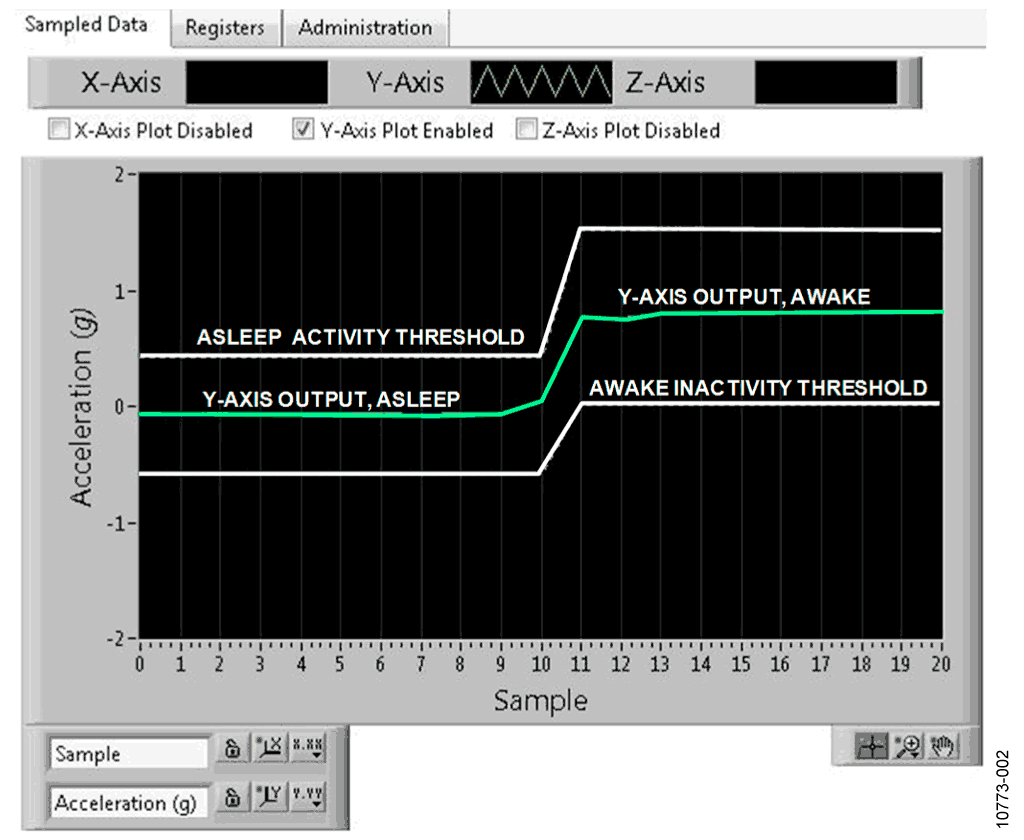
For better visibility, the X-axis and Z-axis plots are disabled using the radio buttons above the chart.
The output of the ADP195, or the interrupt pin itself, was measured using a digital multimeter. When the ADXL362 is awake, the interrupt goes high and drives the EN pin of the ADP195, high, which in turn drives the gate of the MOSFET low, causing the switch to close, connecting any downstream circuitry to the power supply. Conversely, when the ADXL362 is asleep, the interrupt drives the EN pin of the ADP195 low, which in turn drives the gate of the MOSFET high, causing the switch to open.
PCB Layout Considerations
In any circuit where accuracy is crucial, it is important to consider the power supply and ground return layout on the board. The PCB should isolate the digital and analog sections as much as possible. The PCB for this system was constructed in a 4-layer stack up with large area ground plane layers and power plane polygons. See the MT-031 Tutorial for more discussion on layout and grounding, and the MT-101 Tutorial for information on decoupling techniques.
Decouple the power supply to the ADXL362 with 1 μF and 0.1 μF capacitors to properly suppress noise and reduce ripple. Place the capacitors as close to the device as possible. Ceramic capacitors are advised for all high frequency decoupling.
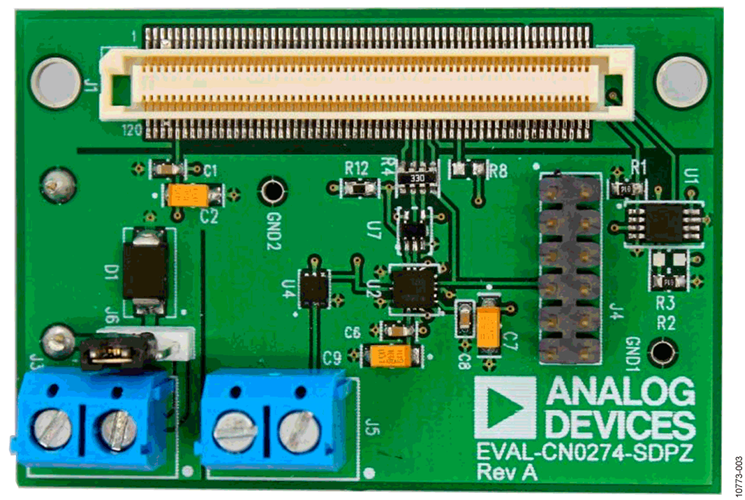
Power supply lines should have as large a trace width as possible to provide low impedance paths and reduce glitch effects on the supply line. Shield clocks and other fast switching digital signals from other parts of the board by digital ground. A photo of the PCB is shown in Figure 3.
A complete design support package for this circuit note can be found at www.analog.com/CN0274-DesignSupport.


Common Variations
The maximum continuous operating current of the ADP195 is fixed at 1.1 A. For applications requiring more downstream power, a higher current rated switch can be used in place of the ADP195.
By sacrificing approximately 15 μA of quiescent current, the ADP197 is capable of providing 3 A of current to downstream circuitry. For applications requiring less downstream power, the ADP190 can be used. It has a continuous current of 500 mA and is available in a smaller WLCSP package than the ADP195.
A second variant of the provided solution is to create a free fall detection system. This function can be implemented using the inactivity interrupt. When an object is in true free-fall, acceleration on all axes is 0 g. Thus, free-fall detection is achieved by looking for acceleration on all axes to fall below a certain threshold (close to 0 g) for a certain amount of time.
The ADXL362 functions as a free-fall detector by setting the inactivity threshold (300 mg to 600 mg) and inactivity time (150 ms to 350 ms). The register setting for these values varies based on the g-range setting of the device.
Circuit Evaluation & Test
This circuit uses the EVAL-SDP-CS1Z System Demonstration Platform (SDP) evaluation board and the EVAL-CN0274-SDPZ circuit board. The two boards have 120-pin mating connectors, allowing for the quick setup and evaluation of the performance of the circuit.
The EVAL-CN0274-SDPZ contains the circuit to be evaluated, as described in this note, and the EVAL-SDP-CS1Z is used with the CN0274 evaluation software to capture the data from the EVAL-CN0274-SDPZ.
Because the ADXL362 requires a relatively small amount of power in both the asleep and awake states, it is possible to power the EVAL-CN0274-SDPZ from the digital data lines coming out of the EVAL-SDP-CS1Z.
Equipment Needed
The following equipment is needed:
- A PC with a USB port and Windows® XP or Windows Vista® (32-bit), or Windows® 7 (32-bit)
- The EVAL-CN0274-SDPZ evaluation board
- The EVAL-SDP-CS1Z evaluation board
- The CN0274 Evaluation Software
- A power supply: 3.0 V or 2 AAA batteries.
Getting Started
Load the evaluation software by placing the CN0274 Evaluation Software CD into the PC. Using My Computer, locate the drive that contains the evaluation software CD and open the Readme file. Follow the instructions contained in the Readme file for installing and using the evaluation software.
Functional Block Diagram
See Figure 4 for the test setup block diagram, and the EVALCN0274-SDPZ-SCH-RevA.pdf file for the circuit schematics. This file is contained in the CN0274 Design Support Package.


Setup
Connect the 120-pin connector on the CN0274 Evaluation Software to the connector on the EVAL-SDP-CS1Z. Use nylon hardware to firmly secure the two boards, using the holes provided at the ends of the 120-pin connectors.
With power to the supply off, connect a 3.0 V power supply to the J3 connector. Alternatively, Connector J2 can be used on the bottom of the PCB to power the entire circuit off two AAA batteries. Connect the USB cable supplied with the EVAL-SDP-CS1Z to the USB port on the PC. Note: Do not connect the USB cable to the mini-USB connector on the SDP board at this time.
Test
Apply power to the J3 screw terminal or place batteries in the J2 connector on the bottom of the PCB batteries (move Jumper J6 to the left-hand position for battery operation). Launch the CN0274 Evaluation Software and connect the USB cable from the PC to the mini-USB connector on the EVAL-SDP-CS1Z.
Once USB communications are established, the EVAL-SDP-CS1Z can now be used to send, receive, and capture serial data from the EVAL-CN0274-SDPZ.
Information regarding the EVAL-SDP-CS1Z can be found in the SDP User Guide.
Information and details regarding test setup and calibration, and how to use the evaluation software for data capture can be found in the software Readme file found at: www.analog.com/CN0274-UserGuide.