
ロジックアナライザのメモリ制限に対する解決策
要約
MATLAB®は、アナログ-ディジタルコンバータ(ADC)の出力から取り込んだデータの迅速な解析に使用することのできる、強力なツールです。このアプリケーションノートでは、MATLABを使用してロジックアナライザのメモリ深度に関する制限を回避する方法について説明します。3つのコードステッチング法(ベーシック、アドバンスド、およびリバース)を説明して比較します。また、3つの方法すべての結果を示します。
はじめに
高速アナログ-ディジタルコンバータ(ADC)の特性を明らかにするには、ディジタル出力コードを取り込んで解析することが必要になります。しかし、ロジックアナライザのメモリ深度に制限があるため、高分解能FFTを作成するとき、あるいはINL/DNLグラフを正確に描写するときに、十分なデータポイントを取り込めないことがよくあります。この問題を回避する簡単な方法は、MATLABなどの数学ツールを用いて複数セットのデータを連結することです(図1)。データ連結の1つの欠点は不連続性が大きいということであり、多くの場合、この不連続性は2つのデータセット間のポイントで見られます。不連続性がある場合、INL/DNLグラフではほとんど違いはありませんが、高分解能FFTでは大きな違いがみられます(図2)。
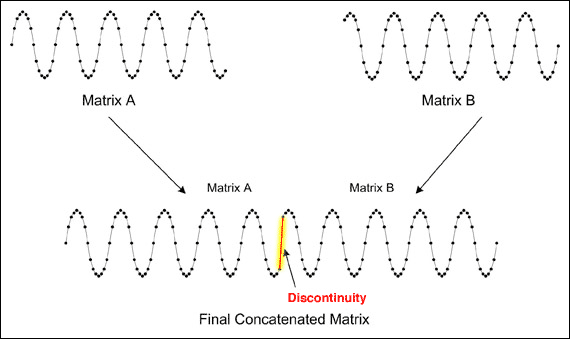
図1. 連結されたデータでは、2つのデータセットの間に不連続性が生じています。
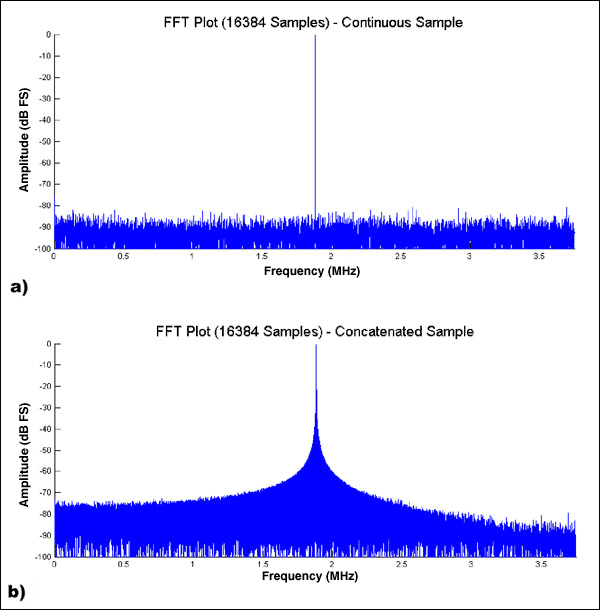
図2. a) 16384ポイントの単一データセットを取り込んで解析。 b) 8192ポイントの2つのデータセットを取り込んで、連結して解析。ステッチング手法。
各データセットで同一グループのポイント(通常3ポイントまたは4ポイント)を見つけて、これらのポイントで2つのデータセットを「ステッチング(つなぎ合わせ)」することによって、不連続性を排除することができます(図3)。このステッチングを行う最も簡単な方法は、1番目のデータセットの最後の4ポイントを記録した後、2番目のデータセットで同じポイントのセットを探すというものです。2番目のデータセットのこの位置は、「ステッチングポイント」と呼ばれます。2番目のデータセットの、このステッチングポイントより前のデータはすべて廃棄されます。2番目のデータセットの残りの部分は1番目のデータセットに連結されます。この手法は「ベーシックコードステッチング」と呼ばれ、極めて簡単に実施することが可能で、MATLABでは非常に迅速に実行されます。
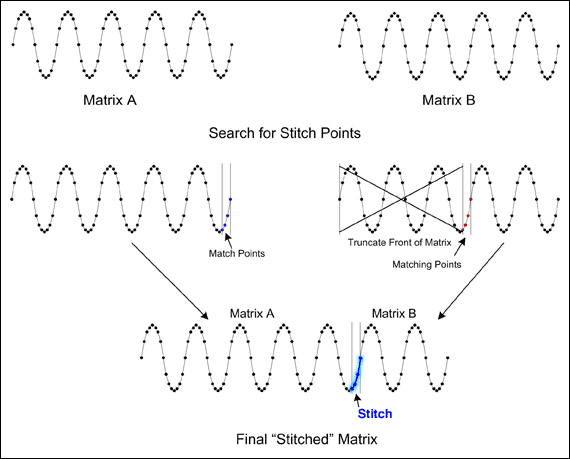
図3. ベーシックコードステッチングによって得られた、最終「ステッチング」マトリクス
ベーシックコードステッチングを使用すると、1番目のデータセットの最後の4ポイントと一致するポイントのセットを探さなければならないため、2番目のデータセットの最大で半分を廃棄することが必要となる場合があります。一方、1番目のデータセットの末端で少数のサンプルを廃棄すると、多くの場合、図4に示すように、2番目のデータセットの先端の近くでステッチングポイントを探しやすくなります。ただし、1番目のデータセットの末端と2番目のデータセットの先端のサンプルを廃棄するマッチングを探すことが困難な場合があります。このプロセスはアドバンスドコードステッチングと呼ばれます。最大の結果データセットが生成される理想的なステッチングポイントを見つけるには、相当の洞察力とプログラミングスキルが必要です。しかし、アドバンスドコードステッチングを適切に実施すれば、通常、2つの小さなデータセットの合計の少なくとも90%を最終データセットとして生成することができます。
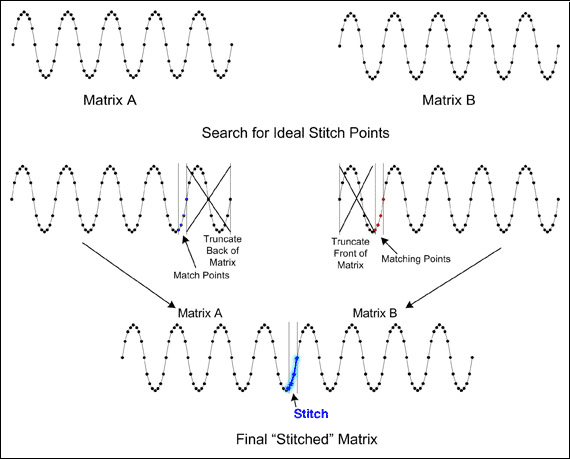
図4. アドバンスドコードステッチングは、最終「ステッチング」マトリクスが得られる理想的なステッチングポイントを探します。
1番目のデータセット(マトリクスA)の前に、2番目のデータセット(マトリクスB)をステッチングする手法はリバースコードステッチングと呼ばれ、大きなデータセットが得られる可能性があります(図5)。ただし、データセットAがデータセットBに先行するときと、データセットAがデータセットBに続くときのステッチングポイントを探さなければならないため、この手法の処理時間は2倍になります。さらに、リバースコードステッチングを他のステッチング法と組み合わせると、通常、効果は最小限になります。つまり、リバースコードステッチングでは必要な処理時間が大幅に増加するため、処理速度の遅いPCではあまり有効ではないと思われます。表1は、3つのコードステッチング法を比較した結果を詳細に示したものです。
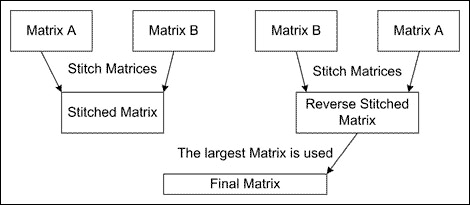
図5. リバースコードステッチングでは処理時間が2倍になり、多くの場合、効果は最小限です。
| Stitch technique | Size of final data set | Description | ||||
| Data set numbers | # of codes (averaged) |
% of two data sets (averaged) |
||||
| 1 + 2 | 3 + 4 | 1 + 4 | ||||
| Concatenate† | N/A | 16384 | 100% | Will produce erroneous FFT; however, INL/DNL can be extracted from this data. | ||
| Basic | 11060 | 8192‡ | 14384 | 11212 | 68.4% | FFT is useable for calculating figures of merit. |
| Reverse | 11060 | 8192‡ | 14384 | 11212 | 68.4% | |
| Advanced | 13790 | 16046 | 16022 | 15286 | 93.3% | |
| Advanced + Reverse |
15427 | 16176 | 16022 | 15875 | 96.9% | |
| *2つの8K (8192コード)のデータセットを上述の方法を用いてステッチングしました。精度を確保するため、8192ポイントのデータを4セット(1~4と表示)使用して、テストを3回繰り返しました。各テストによって得られたデータを平均し、テストデータの右に表示しています。 †連結を行うと、利用可能データの100%を常に得ることができます。 ‡データセットのステッチングは不可能です。 |
||||||
MATLAB関数の概要
添付のMATLABコード(付録AのStitchMatricesと付録BのFindStitchPoint)は、上記のトピックを組み合わせて使い易い1つの関数にしたものです。これらの関数は、2つのデータセット(MATLABの1列のマトリクス)と複数の入力引数を受け取り、これによってアドバンスド/リバースコードステッチング機能が利用可能になります。FindStitchPointルーチンは、データセットAとBのオフセットを識別します。StitchMatricesルーチンは、FindStitchPointルーチンで得られたオフセットを使用してデータセットAとBを廃棄および結合します。さらに、最終データセットのステッチングポイントは、後処理のためにPrevStitchBinsマトリクスに記録されます。複数のデータセットをステッチングするとき、PrevStitchBinsは古いステッチングポイントの位置を保存します。
結論
2つのデータセットをステッチングすることにより、受け入れ可能な結果を得ることができます。図6は、上述のステッチング法を使用してステッチングした8192ポイントの3つのデータセットのFFTグラフです(5つのステッチングポイントを使用)。得られるFFTは、上記の図2aで示される16384ポイントの連続データセットにほぼ等しくなります。
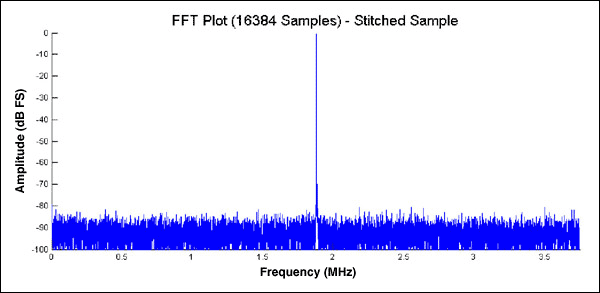
図6. コードのステッチングによって、正確なFFTグラフが生成されます。
付録A:StitchMatricesルーチン(StitchMatrices.m)
function [StitchedMatrix, StitchBins] = StitchMatrices(MatrixA, ...
   				MatrixB, StitchNumber, PrevStitchBins, ...
				AdvCodeStitchEnabled, ReverseStitchEnabled);
%Stitch Matrices Function
%Revision 1.0
%
%By Donald Schelle, May 2005
%Maxim Integrated
%160 Rio Robles
%Sunnyvale, CA, 94086
%
%This function will take two matrices (MatrixA and MatrixB), find a
%given number (StitchNumber) of identical points in each and
%concatenate the two matrices into one.
%
%Inputs = MatrixA, MatrixB (Data Matrices)
%		    StitchNumber (Number of points to match)
%			 PrevStitchBins (Bins of Previous Stitches in MatrixA)
%			 AdvStitchEnabled (0 = NO, 1 = YES)
%			 ReverseStitchEnabled (0 = NO, 1 = YES)
%Output = StitchedMatrix (MatrixA + MatrixB)
%			 StitchBins (bins of StitchedMatrix where the two
%						    matrices were joined.)
%
%If the matrices can not be joined the function will output a NaN
%for both the StitchedMatrix variable and the StitchBins variable
%--------------------------------------------------------------------------

%Check to see that there are at least TWO StitchNumber Points
if StitchNumber < 2,
   %Requested less than 2 stitch points
   StitchedMatrix = NaN;
   StitchBins = NaN;
   return;
end;

%Calculate Size of MatrixA and MatrixB
[SizeA, Junk] = size(MatrixA);
[SizeB, Junk] = size(MatrixB);

%Find the Stitch Points in MatrixB
[NormalA, NormalB] = FindStitchPoint(MatrixA, MatrixB, ...
   					StitchNumber, AdvCodeStitchEnabled);
%Calculate the size of the NormalStitched Matrix
NormalStitchedSize = NormalA + SizeB - NormalB + 1;

%Check to see if the reverse function is enabled
if ReverseStitchEnabled == 1,
   %Find Stitch Points for Reverse Matrices
   [ReverseB, ReverseA] = FindStitchPoint(MatrixB, MatrixA, ...
      					StitchNumber, AdvCodeStitchEnabled);
   %Calculate the size of the Revered Stitched Matrix
   ReverseStitchedSize = ReverseB + SizeA - ReverseA + 1;
else
   %Set Values to defaults
   ReverseStitchedSize = NaN;		%MatrixB/A Stitch Size
   ReverseA = NaN;
   ReverseB = NaN;
end;

%Check to if it's possible to stitch two matrices
if isnan(NormalStitchedSize) & isnan(ReverseStitchedSize) == 1,
   %The two matrices could not be stitched
   StitchedMatrix = NaN;
   StitchBins = NaN;
   return;
end;

%--------------------- Normal Matrix Stitching Routine ---------------
if (NormalStitchedSize >= ReverseStitchedSize)| ...
   			isnan(ReverseStitchedSize) == 1,
   %Stitch MatrixB to the end of MatrixA
   StitchedMatrix = cat(1, MatrixA(1:NormalA), MatrixB(NormalB:SizeB));

   %Update Stitch Bins
   if isnan(PrevStitchBins) == 1,
      %There are no previous stitch bins
      StitchBins = [NormalA, NormalA + StitchNumber - 1];
   else
      %There are previous stitch bins
      %Check for Snipped Stitches
      [SizeStitchBins, Junk] = size(PrevStitchBins);

      while (PrevStitchBins(SizeStitchBins, 2) > (NormalA - 1)),
         %Second Bin is snipped from matrix. Check if first bin is snipped.
         if (PrevStitchBins(SizeStitchBins, 1) > (NormalA - 1)),
            %First Bin is snipped too. Delete Bin Pair
            PrevStitchBins = PrevStitchBins(1:(SizeStitchBins-1),:);
         else
            %First Bin is not snipped but second bin is snipped
            %Shrink Stitch Size
            PrevStitchBins(SizeStitchBins, 2) = NormalA - 1;
         end;

         %Calculate size of new PrevStitchBin Matrix
         [SizeStitchBins, Junk] = size(PrevStitchBins);
      end;

      %Insert New StitchBins
      [SizeStitchBins, Junk] = size(PrevStitchBins);
      StitchBins = PrevStitchBins;
      StitchBins(SizeStitchBins + 1, :) = ...
      [NormalA, NormalA + StitchNumber - 1];

      %Check to see if the last two stitches need to be combined
      [SizeStitchBins, Junk] = size(StitchBins);
      if StitchBins(SizeStitchBins,1) == ...
            (StitchBins((SizeStitchBins - 1),2) + 1),
         %Combine Stitches
         StitchBins((SizeStitchBins - 1),2) = StitchBins((SizeStitchBins),2);
         %Shorten StitchBin Matrix
         StitchBins = StitchBins(1:(SizeStitchBins - 1),:);
      end;

   end;
end;


%--------------------- Reverse Matrix Stitching Routine ---------------
if (ReverseStitchedSize >= NormalStitchedSize)| ...
   			isnan(NormalStitchedSize) == 1,
   %Stitch MatrixA to the end of MatrixB
   StitchedMatrix = cat(1,MatrixB(1:ReverseB), MatrixA(ReverseA:SizeA));

   %Update Stitch Bins
   if isnan(PrevStitchBins) == 1,
      %There are no previous stitch bins
      StitchBins = [ReverseB, ReverseB + StitchNumber - 1];
   else
      %There are previous stitch bins
      %Check for Snipped Stitches
      while (PrevStitchBins(1,1) < (ReverseA + StitchNumber - 1)),
         %First Bin is snipped from matrix. Check if second is snipped
         if (PrevStitchBins(1,2) < (ReverseA + StitchNumber - 1)),
            %Second Bin is snipped too. Delete Bad Pair
            [SizeStitchBins, Junk] = size(PrevStitchBins);
      	     PrevStitchBins = PrevStitchBins(2:SizeStitchBins, :);
         else
            %Second Bin is not snipped, but first bin is snipped
            %Shrink Old Stitch Size
            PrevStitchBins(1,1) = ReverseA + StitchNumber - 1;
         end;
      end;

      %Offset Stitch Bins by inserted amount
      StitchBins = PrevStitchBins + ReverseB - ReverseA + 1;
      %Make Room for new StitchBins
      [SizeStitchBins, Junk] = size(PrevStitchBins);
      StitchBins(2:SizeStitchBins+1, :) = StitchBins;
      %Insert New Stitch Bins
      StitchBins(1,:) = [ReverseB, ReverseB + StitchNumber - 1];

      %Combine close stitches
      if StitchBins(1,2) == StitchBins(2,1) - 1,
         %Combine Stitches
         StitchBins(2,1) = StitchBins(1,1);
         %Shrink Stitch Bins Matrix
	 [SizeStitchBins, Junk] = size(StitchBins);
         StitchBins = StitchBins(2:SizeStitchBins,:);
      end;

   end;
end;
付録B:FindStitchPointルーチン(FindStitchPoint.m)
function [OutputBinA, OutputBinB]=FindStitchPoint(MatrixA, MatrixB, ...
   				MatchNumber, AdvancedStitchFindEnabled)
%Find Stitch Points Function
%Revision 1.0
%
%By Donald Schelle, May 2005
%Maxim Integrated
%160 Rio Robles
%Sunnyvale, CA, 94086
%
%This function will find the IDEAL stitch point in Matrix B given
%the number of data points to match
%
%Inputs = MatrixA
%			 MatrixB
%			 Number of Records to Match
%			 Advanced Stitch Find Enabled (0 = NO, 1 = YES)
%Output = (OutputBinA) End Bin of MatrixA to stitch data
%			 (OutputBinB) Start Bin of Matrix B to stitch data
%
%If no bins are found, the function will output a NaN
%--------------------------------------------------------------------------

%Do argument error checking to see if there is enough arguments
if nargin < 2,
   %The user has not supplied enough arguments
   disp('Function requires TWO Matrices');
   OutputBinA = NaN;
   OutputBinB = NaN;
   return;
elseif nargin < 3,
   disp('Select a number of points to match');
   OutputBinA = NaN;
   OutputBinB = NaN;
   return;
elseif nargin == 3,
   %Advanced code stitching is NOT enabled
   OutputBinA = NaN;
   AdvancedStitchFindEnabled=0;
end;

%Ensure that Matrix A and B are single ROW matrices
[row col] = size(MatrixA);
if row > col, MatrixA = MatrixA'; end;
[row col] = size(MatrixB);
if row > col, MatrixB = MatrixB'; end;

%Determine Size of Matrices
[Junk, SizeA] = size(MatrixA);
[Junk, SizeB] = size(MatrixB);

%Initialize OutputBinB to NaN (which means that NO stitch points are found)
OutputBinB = NaN;
%Set initial size of BinA
BinA = SizeA - MatchNumber + 1;
%Initialize BinStop Variable
BinStop = SizeA-100;

%Loop to search through Matrix B numerous times.  This loop is only
%excuted once if Advanced Stitch Find is disabled.  The loop will stop when
%the 'ideal' stitch point is found
while BinA > BinStop,
   %Stuff the Match Numbers into a separate Matrix
	MatchMatrix = MatrixA(BinA:BinA+MatchNumber - 1);

   %Find all bins in MatrixB that match the first number of the Match Matrix
	MatchedBins = find(MatrixB == MatchMatrix(1));

   %Compare the 2nd through nth number of the Match Matrix with the
   %prospective series of numbers in MatrixB

   %Calculate the size of the Matched Bins Matrix
   [Junk, SizeMatchedBins] = size(MatchedBins);

   %The advanced stitch mode optimizes search time by eliminating
   %bad stitch points that would result in the final concatenated
   %matrix being smaller than the last set of stitch points
   if isnan(OutputBinB) == 0,
      %A Stitch Point exists from a previous run.  Elimiate bad stitch points
      %Calculate critical Stitch Point
      MatrixSize = OutputBinA + (SizeB-OutputBinB) + 1;
      CriticalBin = BinA + SizeB - MatrixSize - 1;
      %Find maximum number in the MatchMatrix
      BadBin = find(MatchedBins > CriticalBin);
      %Eliminate Bad Bins (if there are any)
      if isempty(BadBin) == 0,
         MatchedBins = MatchedBins(1:BadBin(1) - 1);
      end;
      %Calculate size of new Matched Bins Matrix
      [Junk, SizeMatchedBins] = size(MatchedBins);
   end;

   %loop to cycle through initial matched bins
   for i=1:SizeMatchedBins,
      %Check to make sure that there isn't a MatrixB overrun
      if (MatchedBins(i) + MatchNumber - 1) > SizeB,
         break;
      end;

      %Assume that next few codes will match and set StitchBinGood = true
      StitchBinGood = 1;
      %Initialize MatchMatrixCounter
      Count = 1;
      %Cycle through MatrixB and compare Numbers with the MatchMatrix
      for j=MatchedBins(i):(MatchedBins(i) + MatchNumber - 1),
         if MatchMatrix(Count)==MatrixB(j),
            %Number is good, continue and check next number
	     Count = Count + 1;
	 else
            %Number is bad, break loop and try next sequence
            StitchBinGood = 0;
	     break;
	 end;
      end;

      if StitchBinGood == 1,
         %The optimal (first) stitch has been found
         %Record the End bin of MatrixA
         %Record the Start bin of MatrixB
         OutputBinA = BinA;
         OutputBinB = MatchedBins(i) + 1;
         %Calculate the size of the joined Matrix and a new BinStop#
         BinStop = OutputBinA-OutputBinB+1;
         break;
      end;
   end;

   if AdvancedStitchFindEnabled == 1,
      %Advanced Stitch Find is enabled and we should make a new match
      %matrix and search for these numbers
      BinA = BinA - 1;
   else
      %Advanced Stitch Find is disabled and we should end the loop
      break;
   end;
end;

%Check to see if NO Bins Matched
if isnan(OutputBinB) == 1,
   %NO Bins matched
   OutputBinA = NaN;
end;