


The future of EE-Sim® web is ADI Power Studio™ Designer The future of EE-Sim® web is ADI Power Studio™ Designer
ADI is evolving its power design experience with ADI Power Studio™. As of 15 July 2026, existing EE-Sim designs will be available within ADI Power Studio™ Designer while OASIS/SIMPLIS continues to be available for downloadable simulation workflows.
A Modern Path Forward for Power Design
EE-Sim has helped engineers turn power supply requirements into practical design outputs, including schematics, BOMs and simulation results. Power Studio Designer now provides a modern environment for IC-level power supply design, with guided workflows, intelligent component recommendations, performance insights, efficiency analysis, BOM export and support for simulation workflows.
Existing EE-Sim designs will be available in Power Studio Designer, and users can sign in with the same myAnalog account used for EE-Sim today, providing a familiar path into ADI's next-generation design experience. Some design tasks may be presented differently in Power Studio Designer. Migration guidance is available to help users understand common workflow differences and continue working with confidence.
The OASIS/SIMPLIS downloadable simulator remains available and continues to support offline simulation workflows as part of ADI's power management tools portfolio.

Existing EE-Sim designs will be immediately available in Power Studio Designer. Sign in using the same myAnalog account used for EE-Sim today and continue working seamlessly in the new environment.
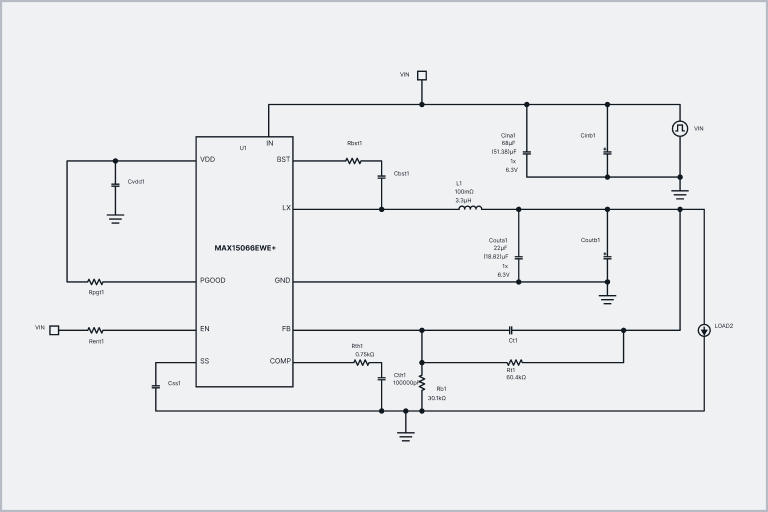
Learn how Power Studio Designer supports IC-level power supply design with guided workflows, intelligent component recommendations, performance insights, efficiency analysis and BOM export.

Some design tasks may be presented differently in Power Studio Designer. Review migration guidance to understand common workflow differences and continue working with confidence and clarity.
To quickly and accurately simulate your circuit designs, Analog Devices offers the OASIS simulation tool. It includes both the SIMPLIS simulation engine, which is the industry’s leading simulator for switched-mode power ICs, and the SIMetrix SPICE simulation engine, known for its robust and speedy convergence.
- Run simulations off-line (without an internet connection)
- Add* or move components using the full featured schematic editor
- Start with ready-to-go schematics, or create a custom design using the online OASIS/SIMPLIS design tool
To ‘Check for Updates’, please simply go to the OASIS Simulator Help menu to access the newest version.
*This free tool restricts the circuit size that may be simulated, but the limits are generous enough to allow for real work.
What is SIMPLIS?
SIMPLIS (SIMulation of Piecewise LInear Systems) is a circuit simulator specifically designed to handle the simulation challenges of switching power systems. Like SPICE, SIMPLIS works at the component level but typically can perform a transient analysis of a switching circuit 10 to 50 times faster. For switching power systems, the piecewise linear (PWL) modeling and simulation techniques employed by SIMPLIS result in qualitatively superior convergence behavior compared to SPICE.
What is SIMetrix?
SIMetrix is a general analog and mixed-signal simulator. It includes an enhanced SPICE simulator, a schematic editor, and a waveform viewer in a unified environment. It is easy to use, offers good accuracy and performance as well as rapid convergence for a broad range of analog and mixed-signal design applications.
Find Demo Circuits
Explore the entire library of ready-to-run SIMPLIS schematics.
How to Videos
How to Analyze the Duty Cycle of a Converter Using OASIS
See how the duty cycle can affect the proper regulation of your converter and learn to quickly analyze it in the OASIS simulation tool to validate your design before it’s built.
SIMPLIS vs. SPICE: Which Is Better for Switching Power Conversion Simulation?
SIMPLIS was initially developed because SPICE did not simulate switching converters effectively. In this video, Brooks will demonstrate how SIMPLIS simulates switching power converters much faster, avoids convergence issues commonly found in SPICE, and has a built-in linearizing algorithm that quickly produces accurate frequency domain response curves (Bode plots).
How to Use OASIS to Correlate Bench Measurements with Simulations
Ben walks through how to take accurate power supply bench measurements, and how to import those measurements into OASIS. He then demonstrates how to troubleshoot and verify a design using this method and the MAX17242EVKIT.
How to Get Started Using the OASIS Simulation Tool to Accurately Simulate Your Circuit Designs
Learn how to simulate a switching power circuit using the EE-Sim OASIS Tool. Built on the SIMPLIS simulation engine, the OASIS simulator for switched-mode power ICs provides over 150 power reference designs, which are ready to copy, modify, and simulate.