


AN-2636: BiSS-C アブソリュート・エンコーダ・プロトコルのTMC8100 向けサポート
説明
TMC8100は、最大16Mbit/sのシリアル同期/非同期アブソリュート・エンコーダ・プロトコル用に最適化された、プログラマブル・マイクロコントローラを内蔵しています。このデバイスは、専用のエンコーダ・プロトコル・インターフェースICやフィールド・プログラマブル・ゲート・アレイ(FPGA)の実装に代えて使用できる一方で、様々なエンコーダ機能のシステム内アップデートや、他のエンコーダ・プロトコルへの切り替えもサポートしています。TMC8100は小型でコスト効率に優れ、なおかつ柔軟な通信ソリューションであり、工業用ドライブにアブソリュート・エンコーダのサポート機能を追加します。
このアプリケーション・ノートでは、BiSS-C インターフェースを備えたアブソリュート・ポジション・エンコーダをサポートするTMC8100ソフトウェアの実装例を詳細に示します。
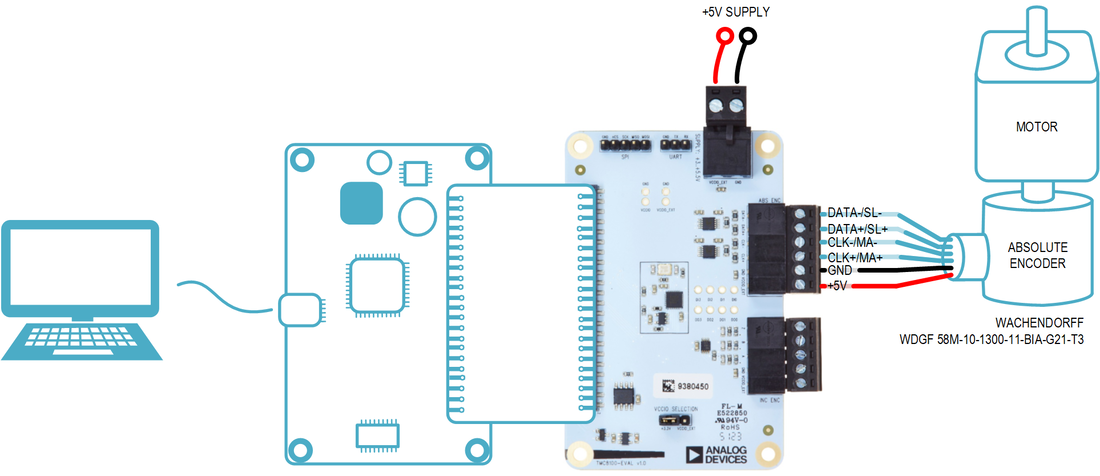
システムの説明
(工業用アプリケーションなどで用いられる)サーボ・モーター・ドライブには、通常、正確で信頼性が高く、しかも低レイテンシの位置フィードバックが必要です。これまで長期にわたり、インクリメンタル A/B/N出力の光エンコーダが業界標準として使われています。それにもかかわらず、アブソリュート・ポジション・エンコーダが次第に多用されるようになっており、その多くはベンダー固有の追加機能や異なるインターフェース・プロトコルを使っています。その一例が、エンコーダとコントローラの間でデジタル・データの同期シリアル転送に使われるBiSS-Cプロトコルです。ポイント toポイント動作の場合、このプロトコルは 2つの独立した接続を使用します。 1 つはコントローラによって生成されたクロック用で、もう 1 つはエンコーダからシフト・アウトされるエンコーダ・データ用です。物理層はRS-422規格に基づいており、位置の値と診断情報をエンコーダからコントローラへ送信できます。また、エンコーダ内のレジスタとの間で読書きもできます(エンコーダ構成など)。
この例では、エンコーダの位置とステータスの情報の読出しと抽出に焦点を合わせます。
BiSS-C インターフェース付きエンコーダは、6本のワイヤで構成される接続ケーブル1本でTMC8100-EVAL-KITに接続します(図1)。6 本のワイヤの内訳は次のとおりです。
- +5VおよびGND:エンコーダ電源とグラウンド接続。
- MA / CLK+およびCLK−:コントローラからエンコーダにクロックを送信するための差動RS-422信号。
- SL / DATA+およびDATA−:エンコーダからコントローラにデータを送信するための差動RS-422信号。
リファレンス実装は次のような機能を備えています。
- 必要な周波数、パルス数、極性を持つクロック信号を出力。
- ライン遅延の補償のために受信データのヘッダに同期する受信データの内部サンプル・クロックを分離。
- 受信データのCRCチェックサムをその場で計算。
- BiSS-Cエンコーダによってサポートされる1Mbps/2Mbps/5Mbps/10Mbpsのデータ・レート例。
- データのパッキングとパッキング解除。
- 13ビットのエンコーダ位置データをグレイ・コードからバイナリ・コードに変換。
リファレンス実装はソース・コードで提供されます。ユーザはこれを出発点として使用し、アプリケーションの必要に応じて変更を加えることができます。
システムの概要
提供されるソフトウェアは、TMC8100-EVAL-KIT と共に使用して動作するよう設計されており、BiSS-C インターフェースを使用してWachendorff 製の WDGF 58M-10-1300-11-BIA-G21-T3エンコーダでテストされています。
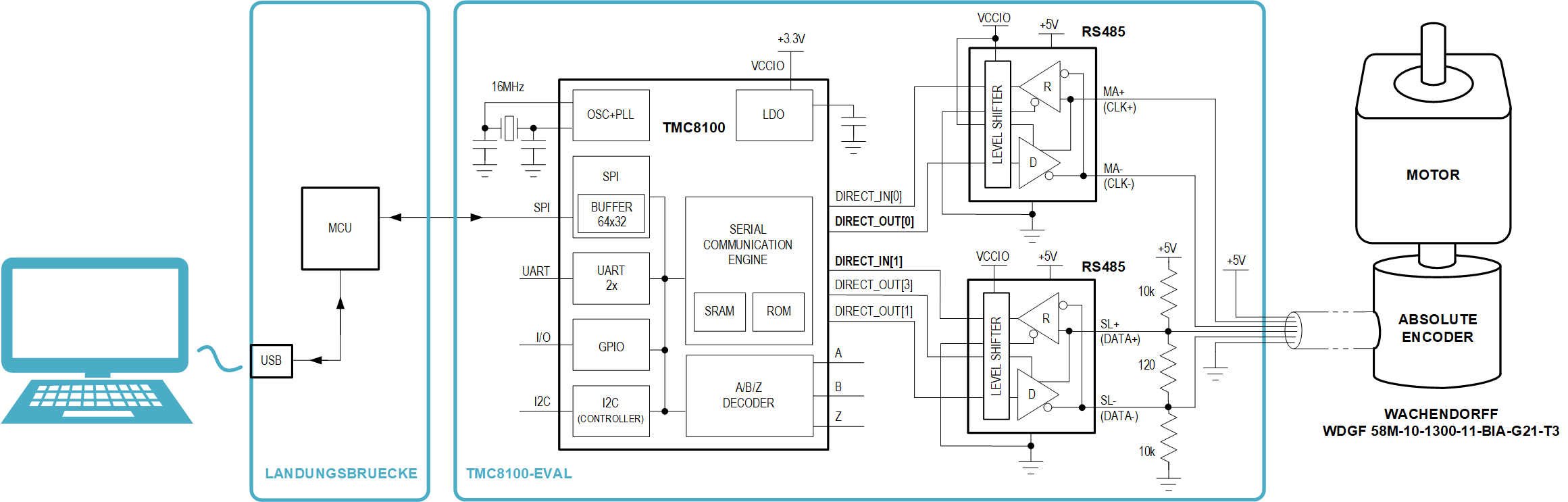
TMC8100-EVAL-KIT に必要なコア・ハードウェア・コンポーネントはTMC8100と2個のRS485トランシーバです。RS485トランシーバは、TMC8100 の信号とコネクタ部での差動RS485信号(MA(CLK+および CLK−)と SL(DATA+および DATA−))との間の変換に使用します(図 2)。このプロトコルでは、恒久的に、MA/CLK 信号用の RS485 トランシーバは出力/トランスミッタとして構成され、SL/DATA信号用のRS485トランシーバは入力/レシーバーとして構成されます。
ソフトウェアには、BiSS-C ポイント to ポイント・プロトコルをサポートするためのコントローラ機能を実装した TMC8100 のファームウェアが含まれています。このファームウェアは、パワーアップ後に TMC8100 にダウンロードする必要があります。ファームウェアの選択とダウンロード、およびその後にエンコーダと共にファームウェア機能のデモとテストを行うための追加 GUI(グラフィカル・ユーザ・インターフェース)は、Pythonスクリプトとして提供されます。
BISS-C プロトコル
BiSS(Bidirectional(双方向)/Serial(シリアル)/Synchronous(同期))は、特にモーターのフィードバック・システムで用いられる、高速プロセス・データを伝送するためのデジタル・シリアル・インターフェース・プロトコルです。BiSS プロトコルは、エンコーダ・データやステータス情報などの伝送の他、エンコーダのデータの流れを中断することなく、レジスタの読出し動作やレジスタへの書込み動作をサポートします。このアプリケーション・ノートでは、コントローラとしてのTMC8100とBiSS-Cインターフェースを備えるエンコーダとの間のポイントtoポイント通信と、エンコーダの位置データおよびステータス情報の読出しに焦点を合わせます。
エンコーダ・データの読出しは、MA(コネクタ・ピン CLK+/CLK−)を用いてクロック信号を送信することにより、TMC8100 が制御します。その後、エンコーダは、その応答信号をSL出力(DATA+/DATA−ピンに接続)に生成し、シリアル化された情報を受信クロック信号の立上がりエッジでシフト・アウトします。
1 つのフレーム内のエンコーダ情報の転送は、アイドル、ヘッダ、データ・チャンネル、タイムアウトの 4 つの主要フェーズに分割できます(図3)。
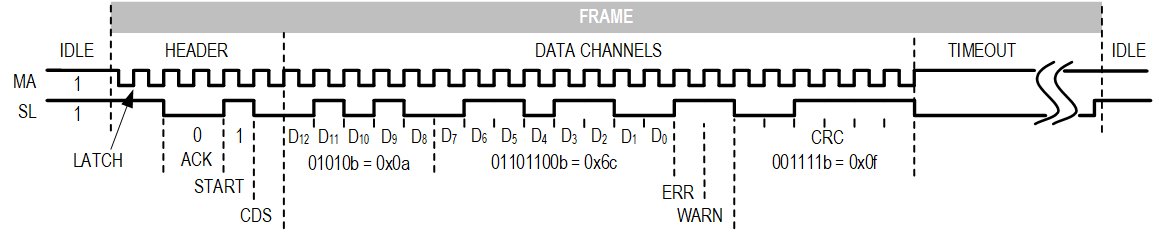
アイドル時にはデータ伝送は行われず、MA と SL の両ラインは常にハイ(「1」)です。新しいエンコーダ値を取り出すために、TMC8100 は、MA ラインにクロック・パルスを発生します。クロック・ラインの最初の立下がりエッジは、ヘッダの新しいフレームと開始を示します。その後、クロック信号の最初の立上がりエッジが、エンコーダ内の新しい位置データのラッチと処理をトリガします。クロック信号の2番目の立上がりエッジで、エンコーダはSLラインをロー(ACKビット、常に「0」)に引き下げます。
SL 信号の最初の立上がりエッジ(STARTビット、常に「1」)で、エンコーダはデータ伝送の開始を示します。エンコーダには、内部処理のために一定の時間が必要であるため、バス・クロック周波数が高い場合には STARTビットが遅延され、SLラインの立下がりエッジ後に複数のACKビットが挿入される場合があります(例えば、図3において、STARTビットの前に2つのACKビットがあります)。ACK ビットが追加されたためだけではなく、ケーブルを信号が伝搬する時間も必要であるために、受信データはクロックを基準としてシフト/遅延される場合があり、そのため、TMC8100 ファームウェアは、START ビットの始まりのこの立上がりエッジを用いて、受信データ・ストリームとの同期およびサンプル・ポイントの調整を行います(ライン遅延補償)。
START ビット後にエンコーダによってシフト・アウトされる最初のビットは、エンコーダからコントローラへの制御通信の一部であるCDS ビットです。このビットの後、エンコーダ位置情報(13ビット・シングル・ターン(ST))がMSBファーストで転送されます。エラー(ERR)ビットおよび警告(WARN)ビットがこれに続きます。これらのビットはアクティブ・ロー(「1」 - エラー/警告なし)です。最後に、6ビットのCRCチェックサムが送信されます。チェックサムは、CRC多項式P(x) = x^6 + x^1 + x^0を用いて、ST値で始まるデータ・チャンネル情報から計算されます。CRCの結果は送信の前に反転されます。
このデータの後、タイムアウト・フェーズがあり、エンコーダによって一定の時間、SLがロー(「0」)に引き下げられます。SLラインが再度ハイ(「1」)に引き上げられると、次のエンコーダ値のために直ちに別のフレームを開始できます。
ソフトウェアの概要
TMC8100用BiSS-Cプロトコルのファームウェア実装は、ソース・コード「tmc8100-eval_biss-c_encoder_demo_v10.asm」と、Intel 16進ファイル・フォーマットの機械語コード「tmc8100-eval_biss-c_encoder_demo_v10.hex」で提供されます。機能の最初のテスト/評価用には、「tmc8100-eval_biss-c_encoder_demo_v10.py」という Python スクリプトを使用できます。これは、図 1に示すように、エンコーダを取り付けたTMC8100-EVAL-KITにUSBを介して接続されたPC上で実行できます。
Pythonスクリプト・プログラムを実行するには、まずPythonインタープリタをPCにインストールして、「intelhex」および「pySerial」という Python ライブラリを使用する必要があります。このスクリプトは、グラフィカル・ユーザ・インターフェース用の「tkinter」を使用します。
TMC8100-EVAL-KIT にエンコーダを接続して USBで PCに接続し、TMC8100-EVAL-KITに+5Vを加えると、コマンドラインから Pythonスクリプトを実行できます(図4)。
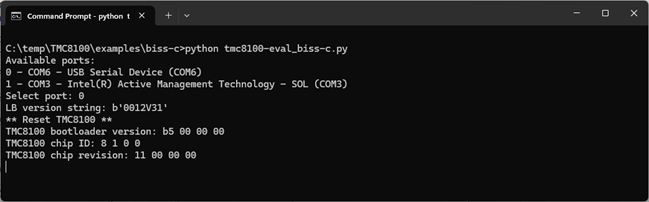
最初に、TMC8100-EVAL-KIT への USB 接続に使用する仮想 COM ポートを選ぶ必要があります。この例では「COM6」です。ターミナル・ウィンドウに表示された出力行には、既にLandungsbruecke(LB)への接続に成功してTMC8100を検出したこと、およびそのチップIDとリビジョン番号が示されます。
その後、別ウィンドウにグラフィカル・ユーザ・インターフェースが自動的に起動します。
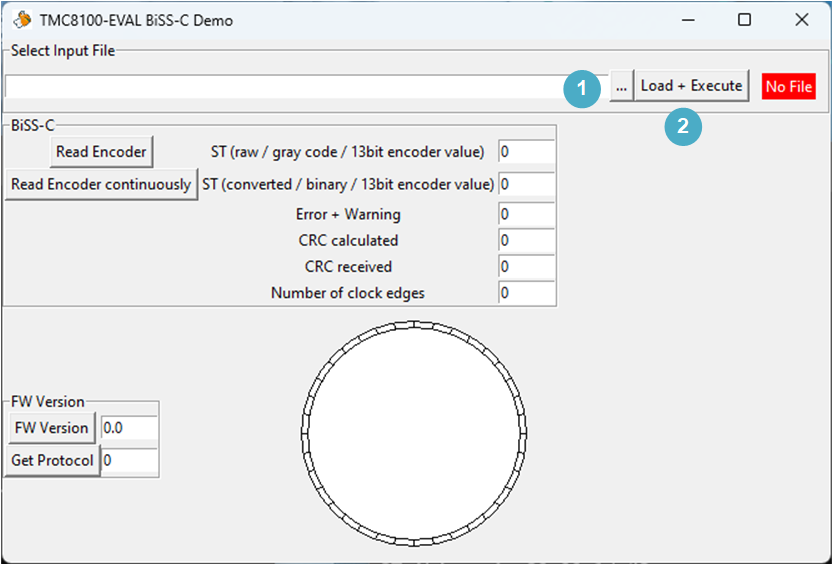
まず、[Select Input File]フレームの[…]ボタン(1)を使い、TMC8100 用のサンプル・コードが格納された 16 進ファイル「tmc8100eval_biss-c_encoder_demo_v10.hex」を選択します。次のステップとして[Load + Execute]ボタン(2)を押すと、ブートローダによりファイルの内容がUSBとLandungsbruecke(LB)を用いて TMC8100の SRAMプログラム・メモリに書き込まれます。プログラムの実行が開始されます。このプログラムは、固有の通信プロトコルを使用してエンコーダにアクセスします。例えば異なるプログラムをダウンロードするために TMC8100 を再びブートローダ・モードにするには、TMC8100 のリセットまたは電源サイクルを行う必要があります。Python GUI で[Load + Execute]を押すと、自動的にTMC8100をリセットしてから、新しいファームウェアをダウンロードします。
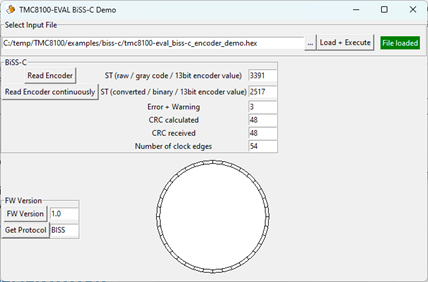
ウィンドウの中段にある[BiSS-C]フレームには、エンコーダの読出しを開始するためのコマンド・ボタンが 2 つあります。[Read Encoder]を押すと、それぞれの数のクロック・サイクルを送信して 1 回転内の絶対位置をリード・バックするよう求める命令が、TMC8100 にロードされたファームウェアに送られます(図6 - 「ST」(エンコーダ・シングル・ターン)ラベルの隣に表示)。ここではこれが、エンコーダから直接受信したグレイ・コード・フォーマット[ST (raw/gray code/13-bit encoder value)]と、変換後の 13 ビット値[ST (converted/binary/13-bit encoder value)]で表示されます。変換は TMC8100 のファームウェア内で行われ、オリジナルのグレイ・コード数値が送信されます(参考用としてここに表示)。
エンコーダの読出し時に送信されたエラーと警告の2ビットが、エンコーダ位置の値の下に表示されます。この例ではどちらも「1」です(11b = 3d)。これらはアクティブ・ローで送信されます。
デバッグのため、受信したCRCチェックサムと(受信したSTおよびエラー/警告ビットから)計算したCRCチェックサムも表示されます。
情報提供のために、ファームウェアが1回のBiSS-Cフレーム/エンコーダ読出しに用いるクロック・エッジの数が報告されます。
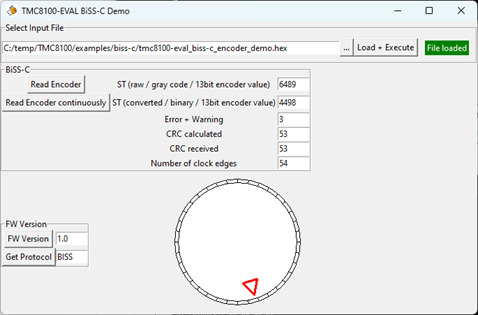
[Read Encoder continuously]を押すと、エンコーダ値の読出しが Python プログラムによって連続的にトリガされます(図 7)。それによって、エンコーダ位置のST値(バイナリのみ)と、現在の360º絶対角位置を示す赤色の位置マーカーを備えたアナログ・ダイアル・ホイールが更新されます。その他の値は、性能上の理由で更新されません。連続エンコーダ読出しを停止する場合、およびこれ以外のボタンを押す場合には、Pythonプログラムの実行を終了するか再起動する必要があります。
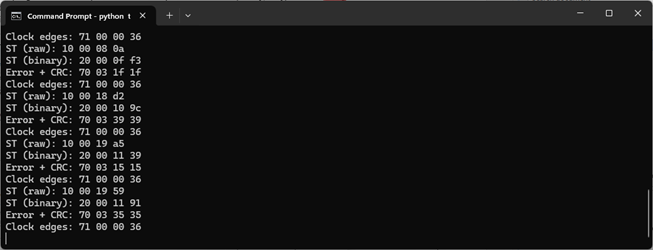
抽出/関連データの表示されるGUIと並行して、コマンド・ライン・ウィンドウには生の通信データといくつかの追加情報が表示されます。これらのデータと情報は、TMC8100のサンプル・プログラムを変更/拡張する際に役立ちます(図8)。
注:性能上の理由から、連続エンコーダ読出し中はコマンド・ライン・ウィンドウへの出力が省略されます。
ファームウェアの実装
サンプル・ソース・コード「tmc8100-eval_biss-c_encoder_demo_v10.asm」は出発点として使用できる他、アプリケーションの要件に応じて変更できます。ソース・コードの変換には、アセンブラを使用できます。
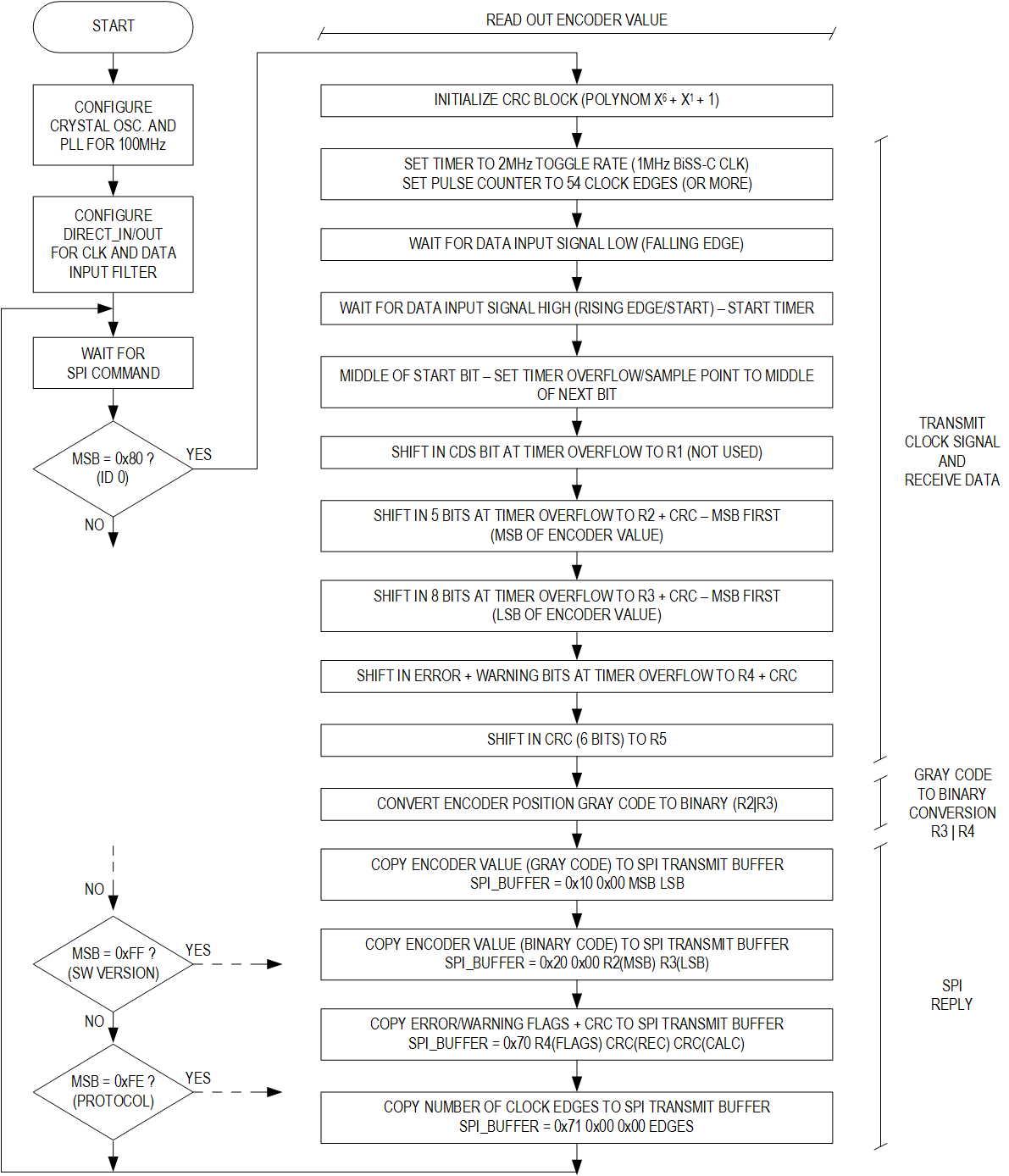
サンプル・コードの概要をフロー・チャート(図10)に示します。
ファームウェアのソース・コードは、可読性向上のために、いくつかの定数値(例えばソフトウェア・バージョンやサポートされているプロトコル)の定義と、TMC8100内にある周辺装置のレジスタ・アドレスの定義から始まります(図9)。
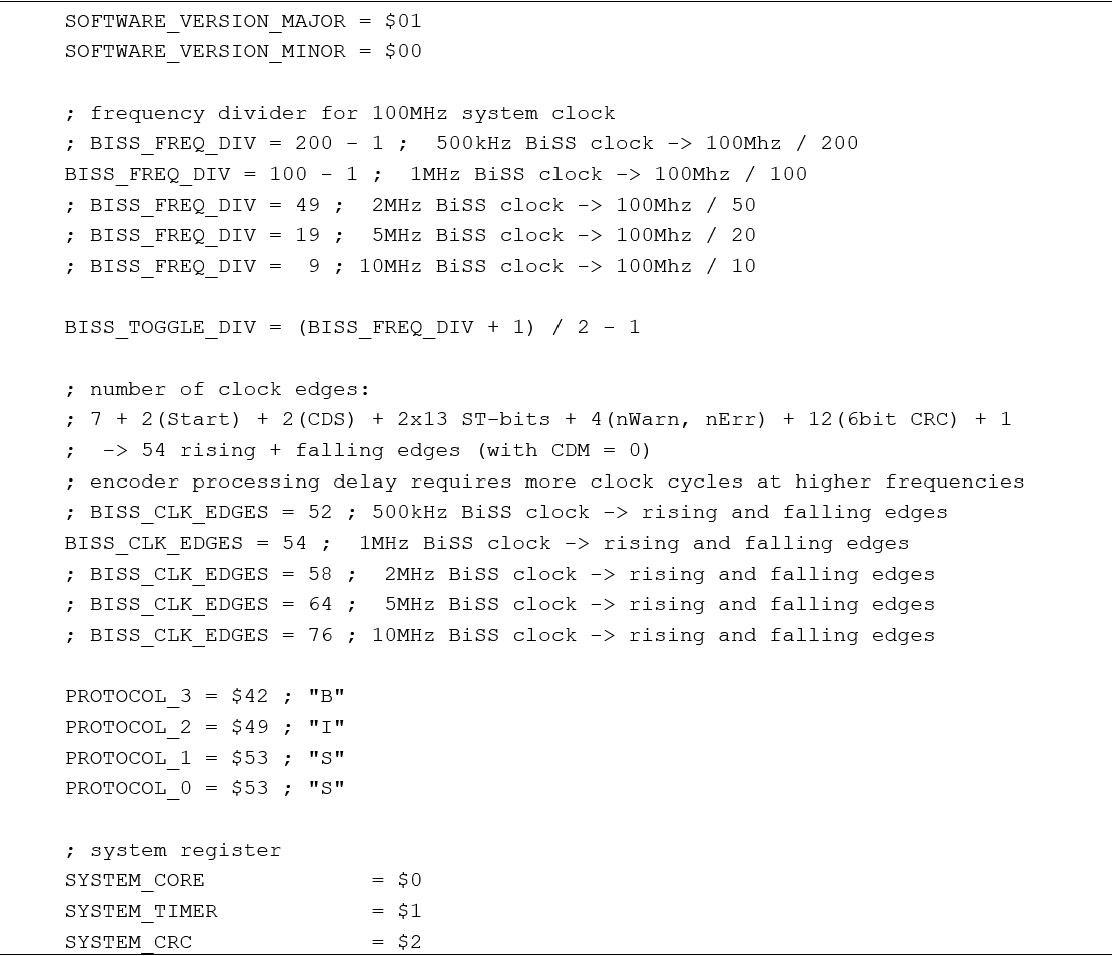
設定を簡略化するために、BiSS-C のクロック周波数(BISS_FREQ_DIV)と 1 フレームに対するクロック・エッジの数(BISS_CLK_EDGES)をここで設定できます。定数「BISS_FREQ_DIV」は、システム・クロック周波数(このファームウェア・プログラム例では100MHzに設定)用の分周比です。例えば、BiSS-Cのクロック周波数を1MHzにするには、分周比を100 − 1(クロック分周器は 0 からBISS_FREQ_DIV で定まる制限値までカウントするため)に設定する必要があります。クロック・エッジの数(BISS_CLK_EDGES)は、このエンコーダで低いBiSS-C周波数を用いる場合には最小で52に設定できます。しかし、これより高いバス周波数では、ACKビットが加わることにより内部処理遅延が生じるため、データ転送を正しく行うためにより大きな値に設定する必要があります。1 つの BiSS-C フレームの送信前後でクロック・ラインのアイドル状態は「1」であるため、クロック・エッジの数は常に偶数である必要があります。
SPI の設定
TMC8100 で使用できる標準的な SPI信号(SPI_CSN、SPI_SCLK、SPI_SDI、SPI_SDO)は設定不要です。これらの機能とパッケージのピン割り当ては固定されています。ただし、追加信号SPI_DATA_AVAILABLEを使用できます。この追加信号はGPIO(6)ピンの代替機能として設定でき、TMC8100 内のファームウェアによって SPI 出力バッファ(ハイ「1」を出力)に書き込むデータを表示できます。これにより、接続したマイクロコントローラへフィードバックを行い、更にマイクロコントローラが SPI データグラム/トランザクションを開始して、それ以前にTMC8100から送信されたコマンドへの応答データをフェッチできます。この機能は起動後にブートローダによって既に設定されていますが、ここには確実を期すために示しています(図11)。

クロックの選択と初期化
TMC8100 は常に内部発振器で起動し、パワーオン/リセット後にブートローダが75MHzのシステム・クロック周波数でPLLを設定します。この例では、TMC8100-EVAL-KIT に搭載された 16MHz の水晶を使用する発振器が使われています。PLL 出力とシステム周波数は、その後のクロック計算/分周設定を容易にするために、100MHzに設定されています。通信用のリファレンス・クロックはTMC8100自体に内蔵されているので、BiSS-C インターフェース使用時に必ずしも水晶クロックが必要なわけではありません。したがって、ここでは、PLLと共にTMC8100の内部クロックを使用することも1つの選択肢です。
最初のステップとして、GPIO0ピンおよびGPIO1ピンを内部水晶発振器との併用で外部水晶用に設定します(図12)。
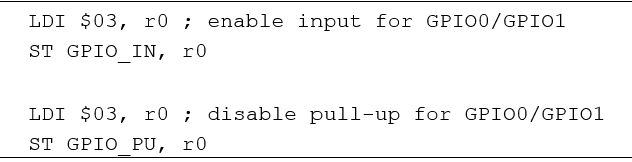
次のステップでは、100MHzのPLL出力周波数(PLL_FB_100)と水晶発振器(XTAL)クロック回路に合わせてPLL帰還分周器が設定され、PLL入力におけるクロック周波数が1MHzとなるようにPLL入力分周器が設定されます(図13)。クロック・ブロックのアドレスはレジスタごとに間接的に指定されるので、書込みアクセスには 4 つのコマンドが必要です。まずロード命令(LDI)とストア命令(ST)のペアでレジスタ・アドレスを設定し、その後にもう1つのロード命令とストア命令のペアで新しいレジスタ値を設定します。
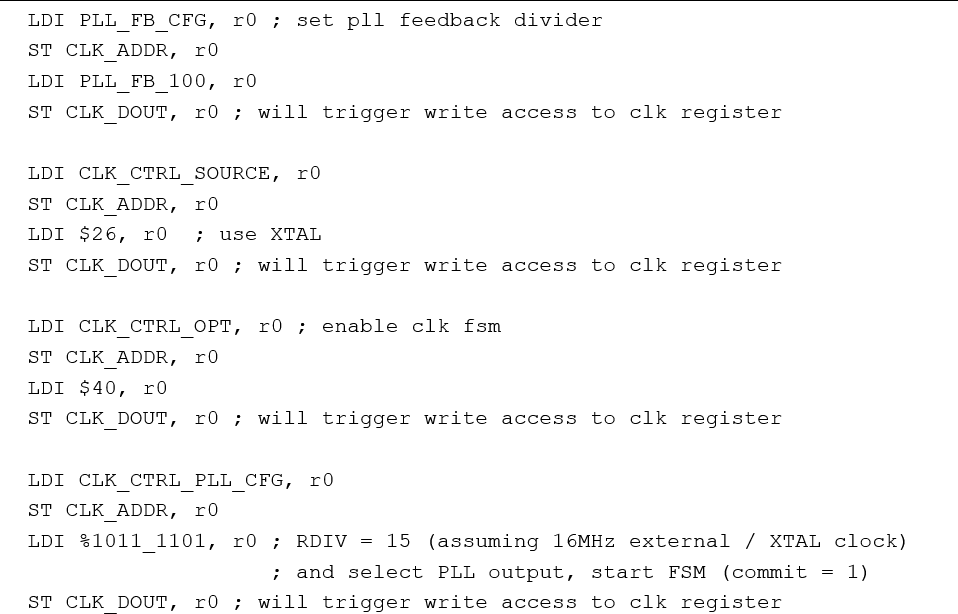
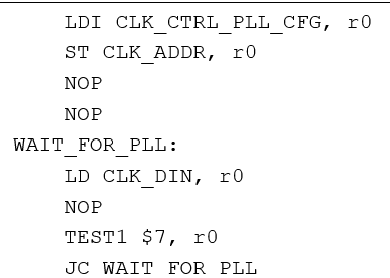
最後の書込みアクセスは、すべての変更を適用するためにクロック・ブロックの内部ステート・マシンもトリガします。これには水晶発振器の起動とPLLロックが含まれるので、クロック・ブロックのステータス・レジスタをチェックして、新しい100MHzのシステム・クロックを使用できるようになるまで待つ必要があります(図 14)。したがって、クロック・ブロックの設定レジスタ(CLK_CTRL_PLL_CFG)のアドレスが選択され、ビット 7(TEST1 $7, r0)がクリアされるまでプログラム・ループがこのレジスタを読み出してから、初めてその後のプログラム実行へ移行します。
DIRECT_IN/DIRECT_OUT ピンの設定
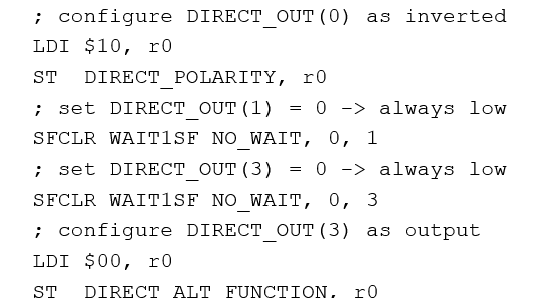
図2に示すように、エンコーダとの通信にはTMC8100-EVAL-KIT上にある両方のRS485トランシーバが使われます。ブロック図の上側にあるRS485トランシーバは、TMC8100からエンコーダへのクロック信号の送信に使用します。このRS485トランシーバの送信イネーブルは常時オンになっています。ここでは、DIRECT_OUT(0)は、クロック出力のために使用します(コマンド「ST DIRECT_ALT_FUNCITON, r0」で選択される、この出力の代替機能)。
ブロック図の下側にあるRS485トランシーバは、エンコーダからデータを受信するために使用します。この場合、トランスミッタは恒久的にディスエーブルされます。DIRECT_IN(1)はシリアル・データ入力に使用します。一方、DIRECT_OUT(1)と DIRECT_OUT(3)はこのアプリケーションでは不要なので、固定レベルに設定されます(両方ともロー「0」)。
アイドル状態ではクロック・ライン(MA/CLK+)がハイ・レベル「1」なので、対応する出力のDIRECT_OUT(0)は反転されます。
SPI コマンド・ループ
TMC8100 の設定後、プログラムは SPI を通じたコマンド受信をエンドレス・ループで待機します。すべての SPI トランザクションは 32 ビットのデータグラムで行われます。このサンプル・コードのすべてのコマンドは、1 つのデータグラム内に収まります。単純化のために、コマンドの選択と実行用に上位 8ビット(MSB、SPIを通じて最初に受信)だけがテストされます。コマンド・ループは SPIペリフェラル・ブロックのステータス・レジスタ(SPI_STATUS)の読出しから始まり、ステータス・レジスタのビット0が1に変わるまで待機状態となります(WAIT1 $0, r0)。このビット0の変化は、SPIデータグラムが受信されてSPI入力バッファ(SPI_BUFFER)に格納されたことを示します。
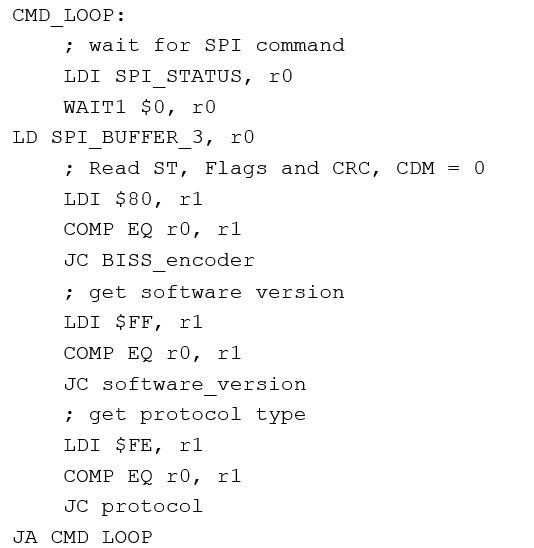
32ビットSPI入力バッファの内容の上位8ビットは、$80(フラグと位置の値を含むエンコーダ・データを読み出すためにこのサンプル・コードで定義された SPI コマンド)と比較されます。この比較が正常に終了すると、プログラムの実行はアドレス「BISS_encoder」にジャンプします。次いで、このアドレスのプログラム・コード(詳細は以下に記述)が DIRECT_OUT(0)を用いて予め定められた数のクロック・サイクルを送信し、DIRECT_IN(1)を用いてエンコーダから返される応答データを収集します。受信データは32ビットのSPIデータグラムにまとめられて、SPI 出力バッファに格納されます。同時に、SPI_BUFFER_AVAILABLE/GPIO6 がロー「0」からハイ「1」に変化して、SPIトランザクションの新しいデータが使用可能になったことを示します。次のSPIトランザクションで、このデータを読み出すことができます。前のコマンドのすべてのデータが読み出される前に、新しいコマンドを送信してはいけません。1 つの SPI トランザクションは常に両方向にデータを転送し、通常はすべての応答データを読み出すのに複数のトランザクションが必要になるので、「ダミー」コマンド(例えば0x00 0x00 0x00 0x00)を使用することが推奨されます。コマンド・ループは、追加読出しのためにこのダミー・コマンドを解釈することはありません。読出しの最後のトランザクションには、次のコマンドを含めることができます。
TMC8100-EVAL-KITによるエンコーダ実装「tmc8100-eval_biss-c.py」のテストに使用できるPythonスクリプトは、GUIに[Read Encoder]ボタンを提供します。このボタンを押すと、SPIデータグラム0x80 0x00 0x00 0x00の送信を指示する命令がLandungsbruecke(LB)に送られます(「tmc8100-eval_biss-c.py」から抜粋)。
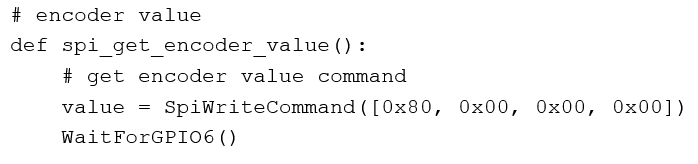
その後、プログラムはエンコーダからの応答を待ちます。SPI_DATA_AVAILABLE/GPIO6 ピンは、TMC8100 の SPI 出力バッファに応答データが格納されると、すぐにロー「0」からハイ「1」に切り替わります。このデータの読出し時、Python プログラムは、TMC8100 のファームウェアによって解釈されないSPI「ダミー」コマンド0x00 0x00 0x00 0x00を使用します。
 # get ST value (raw / gray code value)
 value = SpiWriteCommand([0x00, 0x00, 0x00, 0x00])
 print(f"ST (raw): {value[0]:02x} {value[1]:02x} {value[2]:02x} {value[3]:02x}")
 . . . .
 # get ST value (binary value)
 value = SpiWriteCommand([0x00, 0x00, 0x00, 0x00])
 print(f"ST (binary): {value[0]:02x} {value[1]:02x} {value[2]:02x} {value[3]:02x}")
 . . . .
 # get Error + Warning, CRC received and CRC calculated
 value = SpiWriteCommand([0x00, 0x00, 0x00, 0x00])
 print(f"Error + CRC: {value[0]:02x} {value[1]:02x} {value[2]:02x} {value[3]:02x}")
 . . . .
 # get number of clock edges
 value = SpiWriteCommand([0x00, 0x00, 0x00, 0x00])
 print(f"Clock edges: {value[0]:02x} {value[1]:02x} {value[2]:02x} {value[3]:02x}")
 . . . .
サンプル・プログラムがサポートするすべてのSPIコマンドと、使用可能な応答データの概要を以下の表に示します。SPIコマンドは常に1 個の 32 ビット・データグラム内に収められますが、(この例では)応答に最大 4個の 32 ビット・データグラムを使用できます。 SPI 32 ビット・データグラムは4個の連続した16進数として与えられます。これは1バイトあたり1個の16進数で、可読性向上のためMSBファーストになっています。応答の場合、32ビット・データグラムはSPIバッファに格納された順番(読み出せる順番)で示されます(先入れ/先出し(FIFO))。
| SPI-COMMAND (32-BIT) | SPI-REPLY (32-BIT) |
| 0x80 0x00 0x00 0x00 Read encoder absolute position value within one rotation (ST) and flags/status/information. |
|
| 0xff 0x00 0x00 0x00 Get firmware version. |
|
| 0xfe 0x00 0x00 0x00 Get encoder protocol. |
|
[Read Encoder continuously]ボタンを押すと、Pythonプログラムが表の最初のコマンド0x80 0x00 0x00 0x00を繰り返し送信します。
エンコーダ・データの読出し
TMC8100ソフトウェアがSPIコマンドの受信を待っている状態で新しいSPIコマンドが受信され、なおかつ上位バイト/32ビット・データグラムから最初に受信したバイトが$80に等しい場合は、直ちにプログラム実行がプログラム・コード内の「BISS_encoder」アドレスにジャンプしてCRCブロックが初期化され、シリアル・データをシフト・インしながらオンザフライのCRC計算が開始されます。CRC多項式はP(x) = x^6 + x^1 + x^0に設定され、開始値はゼロに設定されます。
BISS_encoder:
      . . .
      ; initialize crc block
      LDI $0, r0
      STS $0, SYSTEM_CRC, SYSTEM_CRC_CTRL_W ; reset CRC block
      LDI $0, r0
      STS r0, SYSTEM_CRC, SYSTEM_CRC_START_W ; LSB, initialize CRC start with zero
      STS r0, SYSTEM_CRC, SYSTEM_CRC_START_W
      STS r0, SYSTEM_CRC, SYSTEM_CRC_START_W
      STS r0, SYSTEM_CRC, SYSTEM_CRC_START_W ; MSB
      LDI %0100_0011, r0 ; CRC polynomial: x^6 + x^1 + x^0
      STS r0, SYSTEM_CRC, SYSTEM_CRC_POLYNOM_W ; LSB
   LDI %0000_0000, r0
   STS r0, SYSTEM_CRC, SYSTEM_CRC_POLYNOM_W
   STS r0, SYSTEM_CRC, SYSTEM_CRC_POLYNOM_W
   STS r0, SYSTEM_CRC, SYSTEM_CRC_POLYNOM_W ; MSB
プログラム・ソース・ファイルの開始時の BISS_FREQ_DIV および BISS_TOGGLE_DIV 定数設定値を用いると、DIRECT_OUT(0)の BiSS-C クロック出力信号は1MHzに設定されます。システム・カウンタがオーバーフローすると、その都度クロック出力がトグルします。したがって、システム・カウンタは、BISS_TOGGLE_DIVを用いて出力クロック周波数の2倍に設定されます(この場合は2MHz)。
クロック・エッジの数は、BISS_CLK_EDGES定数を用いて定義されます。1MHzのBiSS-Cクロック周波数の場合、この例では54エッジに設定されます。クロック周波数が更に高い場合、ACKビットが追加されたり、このエンコーダの内部処理時間によりヘッダが長くなったりするため、エッジの数を増加してそれを補償する必要があります(例をソース・コードに示します)。アイドル状態時に 1 フレームの送信の前後でクロック・ラインが確実にハイ「1」になるようにするために、エッジ(クロック・ラインの立上がりと立下がり)の数は常に偶数でなくてはなりません。
システム・タイマーの最終ステップとして、カウンタ初期化クロック生成が開始されます。
; init counter
LDI BISS_TOGGLE_DIV, r0 ; set toggle rate for BiSS clock generator
STS r0, SYSTEM_TIMER, SYSTEM_TIMER_COUNTER_LIMIT_W
; number of clock edges:
LDI BISS_CLK_EDGES, r0 ; number of rising and falling edges
STS r0, SYSTEM_TIMER, SYSTEM_TIMER_PULS_COUNTER_LIMIT_W
LDI 1, r0 ; enable counter
STS r0, SYSTEM_TIMER, SYSTEM_TIMER_CTRL_W
次のステップでは、DIRECT_IN(1)入力でエンコーダからの応答データがキャプチャされます。
ファームウェアは、フィードバック・データ信号 SL/DATA+がハイ「1」からロー「0」に変化してエンコーダからのアクノリッジの開始を示すまで待機します。この時点で、エンコーダは既に内部で新しいエンコーダ値の処理をラッチ/開始しています。再度データ信号が立ち上がると、実際のデータ伝送がSTARTビットから始まり、ファームウェアは、内蔵システム・タイマーを、1クロック・サイクルの半分、つまり、START ビットの中間でオーバーフローするように設定します。システム・タイマーは、BiSS-C クロックを生成するシステム・カウンタと同じクロックを使用して、同じ時間測定値を取得します(ACKビットの追加やエンコーダ・ケーブルの長さが原因となる信号伝搬遅延があった場合には単に時間的にシフトされます)。START ビットの中間において、タイマーの制限値は 1フル・クロック・サイクルに更新されます。そのため、システム・タイマーの次のオーバーフローは、次のビット(CDS)の中間で生じます。

 LDI BISS_TOGGLE_DIV, r0 ; from rising edge of start bit to middle of start bit
 STS r0, SYSTEM_TIMER, SYSTEM_TIMER_LIMIT_W
 WAIT0SF WAIT_IN1, WAIT_NO_ACTION ; wait for falling edge of data signal '0'
 WAIT1SF WAIT_IN1, WAIT_START_TIMER ; wait for rising edge of start bit '1' and start timer
 ; wait until middle of start bit
 WAIT1SF WAIT_OVERFLOW_TIMER, WAIT_NO_ACTION
 LDI BISS_FREQ_DIV, r0 ; set sample point to middle of next bit / 1 clock cycle
 STS r0, SYSTEM_TIMER, SYSTEM_TIMER_LIMIT_NO_RESET_W
 LDI 0, r1
 ; middle of CDS - shift CDS into r1
 SHLI WAIT1SF WAIT_OVERFLOW_TIMER, r1, FLAG_IN1
 ; encoder data 13bit
 ; MSB - shift upper 5bit of encoder data into r2
 LDI 0, r2
 REP 5, 1
 SHLI WAIT1SF WAIT_OVERFLOW_TIMER, r2, FLAG_IN1_CRC
 ; LSB - shift lower 8bit of encoder data into r3
 LDI 0, r3
 REP 8, 1
 SHLI WAIT1SF WAIT_OVERFLOW_TIMER, r3, FLAG_IN1_CRC
 ; Error + Warning - shift bits into r4
 LDI 0, r4
 REP 2, 1
 SHLI WAIT1SF WAIT_OVERFLOW_TIMER, r4, FLAG_IN1_CRC
 ; CRC - shift 6 CRC bits into r5 / received CRC
 LDI 0, r5
 REP 6, 1
 SHLI WAIT1SF WAIT_OVERFLOW_TIMER, r5, FLAG_IN1
CDSの値は、コマンド「SHLI WAIT1SF, WAIT_OVERFLOW_TIMER, r1, FLAG_IN1」によって、システム・タイマーのオーバーフロー時にシステム・レジスタr1にシフト・インされます。
CDSビットの後、次の13ビットが、グレイ・コードでエンコードされるエンコーダ位置データになります。これらは、2つのチャンクでシフト・インします。まず、MSBの5ビットがレジスタr2にシフト・インし、同時に、オンザフライCRC計算用にCRCユニットにもシフト・インします。そのためには、コマンド「SHLI WAIT1SF WAIT_OVERFLOW_TIMER r2, FLAG_IN1_CRC」を5回繰り返して使用します(コマンド「REP 5, 1」を使用)。その後、下位8ビットが、システム・レジスタr3およびCRCユニットにシフト・インします。
エンコーダ位置の値の後、2個のステータス・ビット(エラーおよび警告)がr4(およびCRCユニット)にシフト・インし、最後に6ビットCRCコードがレジスタr5(受信CRC)にシフト・インします。
グレイ・コードからバイナリ・コードへの変換
次のステップでは、r2とr3のエンコーダ・カウンタ値がグレイ・コードからバイナリ・コードに変換されます。変換はr2のMSBから開始してビットごとにインプレースで行われます(その結果でレジスタr2とr3の内容が上書きされます)。受信した元のエンコーダ・カウンタ値をデバッグ用に記憶しておくため、変換の前にレジスタr2およびr3の内容がデータ・メモリに保存されます。
このビットごとの変換は以下に示すアルゴリズムを使用します。このアルゴリズムは高い柔軟性を備えており、ビット長が異なる場合でも容易に調整できます。
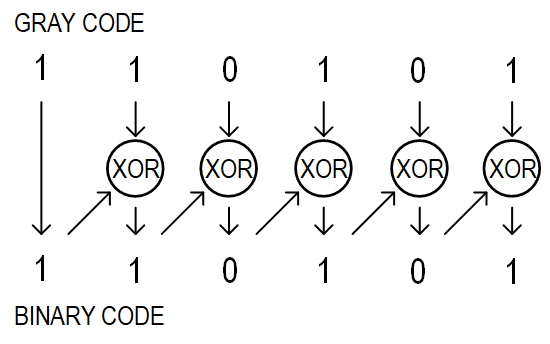
1 ビットを変換するためのソース・コードの例:
TEST1 7, r2
MOVF 0, r0
TEST1 6, r2
MOVF 0, r1
XOR r0, r1, r0
TEST1 0, r0
MOVF 6, r2
r2 のMSBがテストされ(TEST1 7, r2)、そのビットの値に従ってプロセッサ・フラグがセットされます。フラグはその後、補助レジスタr0 のビット0にコピーされます(MOVF 0, r0)。更に次の2つの命令により、同じ要領でレジスタr2のビット6がレジスタr1のビット0にコピーされます。次いで、r0とr1に対してビットごとにXOR演算が行われて、その結果が再びr0に書き込まれます。更にr0のビット0の値が再度システム・フラグに書き込まれて(TEST1 0, r0)、最後にレジスタr2のビット6にコピーされます。これらのステップがr2の残りのビットにも繰り返されて、その後r3に実行が移ります。
SPI 応答データグラム
以上で、受信データと計算データのすべてが使用可能になりました。次のステップとして、接続したマイクロコントローラ/モーション・コントローラによって読み出すことができるように、これらの値がSPIバッファにコピーされます。
最初の32ビットSPIデータグラムは、下位16ビットにコピーされたグレイ・コード(エンコーダから受信した値)の絶対位置情報と、MSBとしての固定値0x10で構成されます。SPIデータグラムの読出し時は、この固定MSB値を使ってこのデータグラムの内容を明確に識別できます。
; copy ST / raw / gray code to SPI transmit buffer
LDI $10, r0
ST  SPI_BUFFER_3, r0
LDI $0, r0
ST  SPI_BUFFER_2, r0
LD  DATA_MEM_ADDR, r0
LD  DATA_MEM_ADDR + 1, r1
ST  SPI_BUFFER_1, r0
ST  SPI_BUFFER_0, r1
2 番目の32ビットSPIデータグラムは、バイナリ・コードに変換された下位16ビットの絶対位置情報(r2|r3)と、MSBとしての固定値0x20で構成されます。
; copy ST / binary code to SPI transmit buffer
LDI $20, r0
ST  SPI_BUFFER_3, r0
LDI $0, r0
ST  SPI_BUFFER_2, r0
ST  SPI_BUFFER_1, r2
ST  SPI_BUFFER_0, r3
3 番目の 32 ビット SPI データグラムは、エラー・ビットと警告ビット、更には、受信 CRC チェックサム値および計算チェックサム値(LSB)で構成されます。計算チェックサムは、受信 CRCチェックサムと一致するよう、送信前に反転されます。MSBは固定値の 0x70です。
; copy status and crc value to SPI transmit buffer
LDI $70, r0 ; crc values
ST  SPI_BUFFER_3, r0 ; 7 -> CRC + STATUS Field
ST  SPI_BUFFER_2, r4 ; Error + Warning
LDS SYSTEM_CRC, SYSTEM_CRC_RESULT0_R, r0
ST  SPI_BUFFER_1, r5 ; CRC received
LDI %0011_1111, r1
XOR r0, r1, r0 ; CRC is inverted
ST  SPI_BUFFER_0, r0 ; CRC calculated
最後に、4番目の32ビットSPIデータグラムは、ソース・コードの定数BISS_CLK_EDGESに設定されたクロック・エッジの数で、デバッグ用に用います。
; copy number of clock edges (r7) to SPI transmit buffer
LDI $71, r0 ; clock edges values
ST  SPI_BUFFER_3, r0 ;
LDI $0, r0
ST  SPI_BUFFER_2, r0
ST  SPI_BUFFER_1, r0
LDI BISS_CLK_EDGES, r0
ST  SPI_BUFFER_0, r0
別のバージョンのサンプル・ソース・コード・ファイルも使用できます(「tmc8100-eval_biss-c_encoder_demo_with_ACK_length_measurement.asm」)。これは、パワーアップ後やファームウェア・ダウンロード後の最初のエンコーダ読出しの一部としてエンコーダから受信するACKビットの数を測定し、それに対応してその後のすべてのBiSSフレームの立上がりエッジと立下がりエッジの数を計算します。それによって、エンコーダとの間で信頼できる通信を確立するために最小限必要なクロック・サイクルの数を示すことができます。
付録
アセンブラ
TMC8100 用サンプル/リファレンス・プログラムの開発および変更には、アセンブラを使用できます。PC ベースのコマンド・ライン・ツールには、パラメータとして、アセンブラ・ソース・コードのファイル名とパス(オプション)を入力する必要があります。入力されたファイル名のファイルが見つからない場合は、入力されたファイル名の末尾に自動的に「.asm」が追加されます。アセンブラは、この入力ファイルから出力ファイルを生成します。
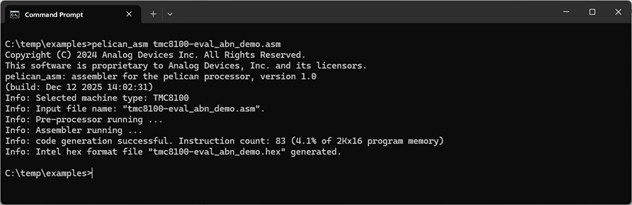
この例では、アセンブリ・ソース・コードが保存された入力ファイルの名前は「tmc8100-eval_abn_demo.asm」です。このファイルから生成される機械語命令(16ビット)の数は83で、これは使用可能なプログラム・メモリ(SRAM)の4.1%に相当します。TMC8100のプログラム・メモリのサイズは2K × 16ビット(最大で2048個の命令)です。
生成されるデフォルトの出力ファイルは1つで、ファイル名は入力ファイルと同じですが、拡張子は「*.asm」ではなく「*.hex」になります。この出力ファイルはIntel標準16進ファイル・フォーマットのプログラム・コードが保存されたテキスト・ファイルであり、例えば、TMCL-IDEまたはサンプル・コードで使用できるPythonスクリプトの1つを使い、TMC8100-EVAL-KITにあるTMC8100のプログラム・メモリにプログラム・コードをロードします。
アセンブラは、異なるフォーマットと追加的な情報で構成されるその他の出力ファイルを生成するためのフラグも、いくつかサポートしています。
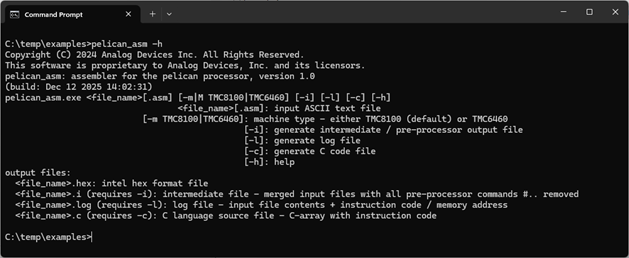
- オプション「-i」:「<filename>.i」というファイルがプリプロセッサからの出力として生成されます。このファイルはアッセンブリ・ソース・ファイルの内容で構成され、すべてのプリプロセッサ・コマンド(# ...)が処理されて(例えば「#include」ファイルの内容がソース・ファイルにマージされる)、すべてのコメント(例えば/* .. */ | // | ;)が削除されます。
- オプション「-l」:アッセンブリ・ソース・コード(コメントとプリプロセッサ・コマンドは含まれない)、追加の命令エンコーディング、およびそれらの命令のプログラム・メモリ・アドレスで構成される「<filename>.log」というファイルが生成されます。
- オプション「-c」:TMC8100 をブートストラップするコントローラ用プログラムの開発を支援するために、Cコードで構成される「<filename.c>」というファイルが生成されます。このファイルは、整数の配列と、生成された機械語コードで構成されます。
- オプション「-m」:機械語フラグ。様々な実装/命令セットをサポートします(デフォルトはTMC8100)。
- オプション「-h」:スクリーンショットに示すようなヘルプの表示テスト。
サポートされている構文/コマンド
TMC8100のデータシートに示すように、現在のところアセンブラはTMC8100のすべての命令をサポートしています。
プリプロセッサ・コマンド
コメント
プリプロセッサは、その後の処理のために入力ファイルからすべてのコメントを削除します。現在は以下のオプションがサポートされています。
- /* <comment> */ - ブロック・コメント - 複数の行を含めることができます(C言語型)
- // <comment> - 行の最後までのコメント(C/C++言語型)
- ; <comment> - 行の最後までのコメント
#include
#include "<filename>" — その後の処理のために、<filename>にファイル名とオプション・パスで示されたファイルの内容が、#include プリプロセッサ・ディレクティブの位置に挿入されます。#includeディレクティブがあった行は削除されます。
注:<filename>の周囲に記述できるのは引用符だけです。その他のコマンド/アサインを含めても、それらはその後の処理で削除/無視されるので含めることはできません。
#define
#define <label> [<replacement text>]
プリプロセッサは、ソース・ファイル(および#include ステートメントによってインクルードされたファイル)内にあるこのコマンド後の<label>を、<replacement text>に置き換えます。置き換えテキストとして使われるのは、<label>の後に置かれて 1 つ以上のスペースによって分離された、<label>からその行の最後までの文字シーケンスです。コメントと引用符内のテキストだけは自動置き換えから除外されます。ラベルはその後、別の#defineを同じ<label>と共に使ってソース・ファイル内で定義し直すことができます。
置き換え文字を指定せずに<label>を定義することも可能です。この場合、置き換え文字はありません。これは、例えば条件付きの#ifdefプリプロセッサ・コマンドや#ifndefプリプロセッサ・コマンドと組み合わせて使用すると便利です。
#ifdef, #ifndef, #else, #endif
#ifdef <label> <code block 1> #else <code block 2> #endif
それ以前に<label>が定義されている場合は<code block 1>の内容が解釈されてアセンブラ出力が生成され、<code block 2>は無視されます。中間ファイル(<filename>.i)には<code block 1>だけが表示され、<code block 2>は表示されません。コード・ブロックには複数行のアセンブラ命令などを含めることができます。<label>が定義されていない場合は、<code block 2>が解釈されます。
#ifndef <label> <code block 1> #else <code block 2> #endif
それ以前に<label>が定義されている場合は<code block 2>の内容が解釈されてアセンブラ出力が生成され、<code block 1>は無視されます。中間ファイル(<filename>.i)には<code block 2>だけが表示され、<code block 1>は表示されません。コード・ブロックには複数行のアセンブラ命令などを含めることができます。<label>が定義されていない場合は、<code block 1>が解釈されます。
注:#define <label>の使用前に<label>名を挙げるだけでも十分です。置き換え用のテキスト/値を示す必要はありません。
#else 部分はオプションです。#ifdefブロックまたは#ifndefブロックはネストできます。
アセンブラ・コマンド
数値
2 進数、10進数、16進数での数値指定を容易にするために、様々なフォーマットがサポートされています。これらを以下に示します。
- 「0x123..」または「$123..」は16進数として解釈されます(使用文字:0~9、a~fまたはA~F)。
- 「%1010..」は 2進数として解釈されます(使用文字:0と1)。可読性向上のために文字「_」を挿入できます(例えば8ビット数の場合は%1010_0011)。
- 「123..」は10進数として解釈されます(使用文字:0~9)。
識別子
可読性向上のため、数値に代えて識別子を使用できます。識別子は、文字(a~z/A~Z)または「_」から始める必要があります。その後は数値(0~9)を使用することも可能です。文字名の大文字と小文字は区別されません。
識別子には等号を使って値を割り当てることができます。例えば、
SPI_BUFFER_0 = $30
識別子に使うべきではない名前も以下のようにいくつかあります。
アセンブラ命令。これには、TMC8100 のデータシートにリストされたすべての名前と、「C」(コマンドの条件付き実行を示す)から始まる命令名が含まれます。
識別子r0~r7は、使用可能なすべての汎用レジスタを指定するためにレジスタ0~7として予め定義されています。
ラベルと識別子を同じ名前にすることはできません。
ラベル
ラベルは、プログラム・メモリ・アドレスのプレースホルダとして使われます。ラベルに値を割り当てる必要はありません。ラベルは、アセンブラがアッセンブリ・ソース・コードを機械語コードに変換する際に最新のプログラム・メモリ・アドレスで初期化されます。
エンドレス・ループの例:
WAIT:
  JA WAIT
ラベル名の後の「:」文字に注意してください。アセンブラは、次の命令(この場合は JA WAIT コマンド)のプログラム・メモリ・アドレスで、ラベル WAIT を自動的に初期化します。実際に命令の一部として使われる前にラベルが初期化されるジャンプ・バック(上の例)と、ジャンプ・フォワード(命令によって参照された後にラベルが初期化される)の両方がサポートされています。